
What Is Claude Cowork? Features, Pricing & How to Use It (2026)
What is Claude Cowork? Anthropic's agent that finishes multi-step tasks in the cloud: features, plans, permission modes, scheduled tasks, use cases and the 2026 merge with chat.
Quick answers (updated Oct 26, 2026)
- What is Claude Cowork?
- Claude Cowork is Anthropic's agent for knowledge work. It uses the same agentic architecture as Claude Code, without a terminal: you describe an outcome, Claude plans it, runs the steps in an isolated cloud environment and returns finished documents, spreadsheets, slides or research.
- Is Claude Cowork free?
- No. Claude Cowork is on paid plans only: Pro, Max, Team and Enterprise. Multi-step tasks use more of your usage limit than quick questions, and auto mode uses more still.
- Does Claude Cowork still exist as a separate mode?
- It is merging into chat. Since Sep 16, 2026 Pro and Max are rolling over to one Claude that decides whether a message needs a quick answer or a task; Enterprise got the same unified experience on Oct 23, 2026. Anthropic still calls the capability Claude Cowork.
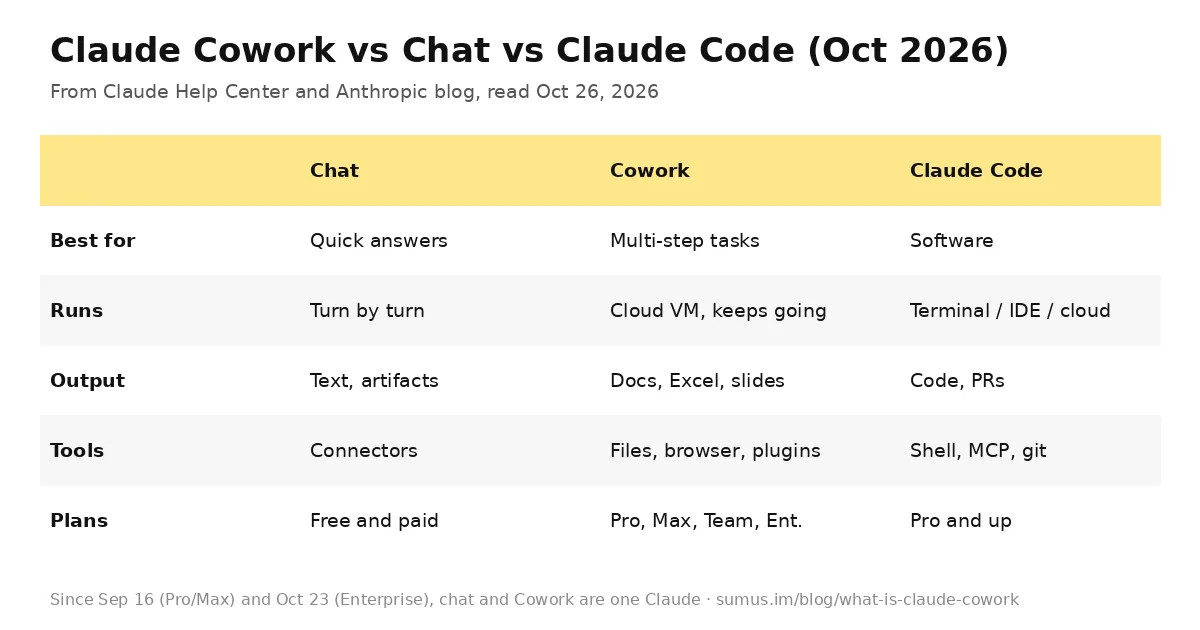
Claude Cowork is the part of Claude that does the work instead of describing it. Ask for a weekly report, an expense sheet from a folder of receipts or a deck from meeting notes, and Cowork breaks the job into steps, runs them and hands back files. Anthropic's Help Center guide describes it as Claude Code's agentic capabilities applied to "knowledge work beyond coding."
This guide is kept by a Sumus AI Employee and updated as Anthropic changes Cowork. It is for people who want to know what Cowork does, what it costs and whether it fits their work.
What is Claude Cowork?
Cowork launched in January 2026 as a research preview in Claude Desktop and grew into Claude's main way to hand off multi-step work. Instead of answering one prompt at a time, Claude takes a task and keeps going. Sessions run remotely in the cloud, so work continues after you close your laptop, and the same session follows you across desktop, web and mobile.
How Claude Cowork runs a task
- Analyzes your request and creates a plan.
- Breaks complex work into subtasks.
- Runs code and shell commands in an isolated environment on Anthropic's servers.
- Coordinates parallel workstreams with sub-agents when useful.
- Delivers finished outputs to your session to preview and download.
You can watch progress, read Claude's reasoning and step in mid-task. When a task needs something on your computer, such as a local folder or your browser, Claude reaches it through the Claude Desktop app, which must stay open for those steps.
Claude Cowork features
- Cloud sessions. Work keeps running with no device online, and you can pick it up on any surface.
- Local file access. On desktop, Claude reads and writes files in folders you connect, with no uploads.
- Professional outputs. Excel files with working formulas, PowerPoint decks and formatted documents, editable further with Claude for Excel and PowerPoint.
- Scheduled tasks. Type /schedule to run a task on a cadence; scheduled tasks run in the cloud.
- Projects. Workspaces with their own files, instructions and memory.
- Shared memory with chat. Cloud sessions start from what Claude remembers from your chats, and you can turn memory off per task.
- Browser actions. Claude can open sites, click, type and fill forms, using a built-in browser in Claude Desktop or Claude in Chrome.
- Plugins. Bundles of skills, connectors and sub-agents for a role or team, shared across chat, Cowork and Claude Code.
Claude Cowork pricing and plans
Surface | Plans |
|---|---|
Claude Desktop (macOS, Windows) | All paid plans |
Web (claude.ai) | Pro, Max, Team; Enterprise if admin enables |
Mobile (iOS, Android) | Pro, Max, Team; Enterprise if admin enables |
Chrome side panel | Max and Team, rolling out to Pro |
Cowork has no separate price; it draws on your plan's usage. Every step uses tokens, so a task that runs code, makes files or browses uses more than a quick question. Anthropic's tips: group related work into one task, start a new conversation for unrelated work, say when you only need a quick answer, and check Settings > Usage.
Permission modes: Manual, Auto, Skip
- Manual (default). Claude asks before actions such as using connectors; you allow or deny each one.
- Auto. Claude keeps working and runs a safety check on each action, blocking anything that looks like data exfiltration or prompt injection. It uses more of your usage limit.
- Skip. No pauses and no automatic checks. Only for tasks where you trust every connector, file and site involved.
Claude always asks before permanently deleting files. Team and Enterprise admins can hide Auto mode and require approval for write-capable connector tools.
How to use Claude Cowork
- Open Claude on web, desktop or mobile on a paid plan.
- If your message box shows Chat and Cowork, select Cowork. If it doesn't, you already have the unified Claude and can just ask.
- Describe the outcome, including format and deadline, for example: "Turn these receipts into an expense report in Excel, grouped by month."
- Review Claude's plan, choose a permission mode and let it run.
- Add global instructions in Settings for tone and format, and folder instructions for project context.
What people use Claude Cowork for
- Organizing a Downloads folder by type and date, or batch-renaming files.
- Turning receipts into a formatted expense report.
- Synthesizing web research, papers and notes into a report.
- Pulling themes and action items from meeting transcripts.
- Building spreadsheets with VLOOKUP and conditional formatting, and decks from rough notes.
- Outlier detection, cross-tabs and charts on your own data.
Chat and Cowork are now one Claude
On Sep 16, 2026 Anthropic began merging chat and Cowork for Pro and Max: you bring a question or a project and Claude decides how to handle it. Claude Docs and Claude Slides arrived the same day, and Claude Design now works inside conversations. On Oct 23 the unified experience became generally available for Enterprise, with agentic work in isolated cloud VMs, network egress off by default and a new Efficient mode for usage. Chats, projects, connectors, skills and plugins carry over.
Claude Cowork vs Claude Code
Same engine, different job. Use Claude Code when the deliverable is software. Use Cowork for anything document-shaped: reports, analysis, decks and file chores. Use plain chat when there is nothing to build.
Claude Cowork limitations
- Paid plans only.
- Sessions can't be shared, though individual artifacts can.
- Local files, browser use and computer use need Claude Desktop open.
- Agentic work with internet access carries prompt-injection risk; review actions involving money, messages sent as you or important files.
Where Sumus fits
Cowork is a personal agent: one person hands off one task. Many teams want the agent in the room instead, taking requests from everyone in the group chat, remembering the team's context and running recurring jobs like reports and monitoring without anyone opening an app. That is what a Sumus AI Employee does, running on models like Claude Opus 5.5.
Claude Cowork FAQ
Is Claude Cowork available on the free plan?
No. Cowork is on Pro, Max, Team and Enterprise. Anthropic says Free gets the unified Claude experience later.
Does Claude Cowork work on Windows?
Yes. Cowork works in Claude Desktop for Windows on all paid plans, using the latest version of the app.
Does my computer need to stay on for Claude Cowork?
Not for cloud sessions or scheduled tasks. Keep Claude Desktop open only when the task uses local files, your browser or your computer.
What is the difference between Claude Cowork and Claude Code?
Both use the same agentic architecture. Claude Code is built for writing software in a terminal or IDE; Cowork is for documents, spreadsheets, slides, research and file tasks, with no terminal.
How do I schedule a task in Claude Cowork?
Type /schedule in a Cowork task or click Scheduled in the sidebar. Scheduled tasks run in the cloud on the cadence you choose.
Why is Claude Cowork using so much of my limit?
Each step uses tokens, and auto mode adds safety checks that use more. Group related work, start fresh conversations for unrelated tasks and check Settings > Usage.
Can a Sumus AI Employee do Cowork-style tasks for my team?
Yes. A Sumus AI Employee works in your team's group chat, takes requests from anyone on the team and runs reports, research and recurring tasks on a schedule.
Update log
- — Oct 26: First published from the Claude Help Center Cowork guide and Anthropic's Sep 16 and Oct 23 announcements.