
Grok Bot vs Cursor: Which One Do You Need? (Oct 2026)
Grok Bot vs Cursor: Cursor writes code, Grok Bot finishes work in your business apps. Plans, shared usage, when to use each, and how to run Grok with Claude.
Quick answers (updated Oct 25, 2026)
- Grok Bot vs Cursor: what's the difference?
- Cursor is a coding agent for building software in your repo, terminal, Slack and GitHub. Grok Bot is a team of always-on AI teammates with their own cloud computer that sign in to your business apps and finish non-coding work like outbound, support queues, invoices and reports. Both now come from the same company.
- Do I have to pay for both?
- No. Since October 12, 2026, The X Subscription bundles Grok, Grok Bot and Cursor. Premium ($30/month) and higher include both, drawing from one shared weekly usage pool.
- Which should I pick?
- If the output is code, use Cursor. If the output is finished work inside tools like a CRM, Gmail or Zendesk, use Grok Bot. If you want Grok plus Claude and GPT in one shared team chat, Sumus runs them side by side.
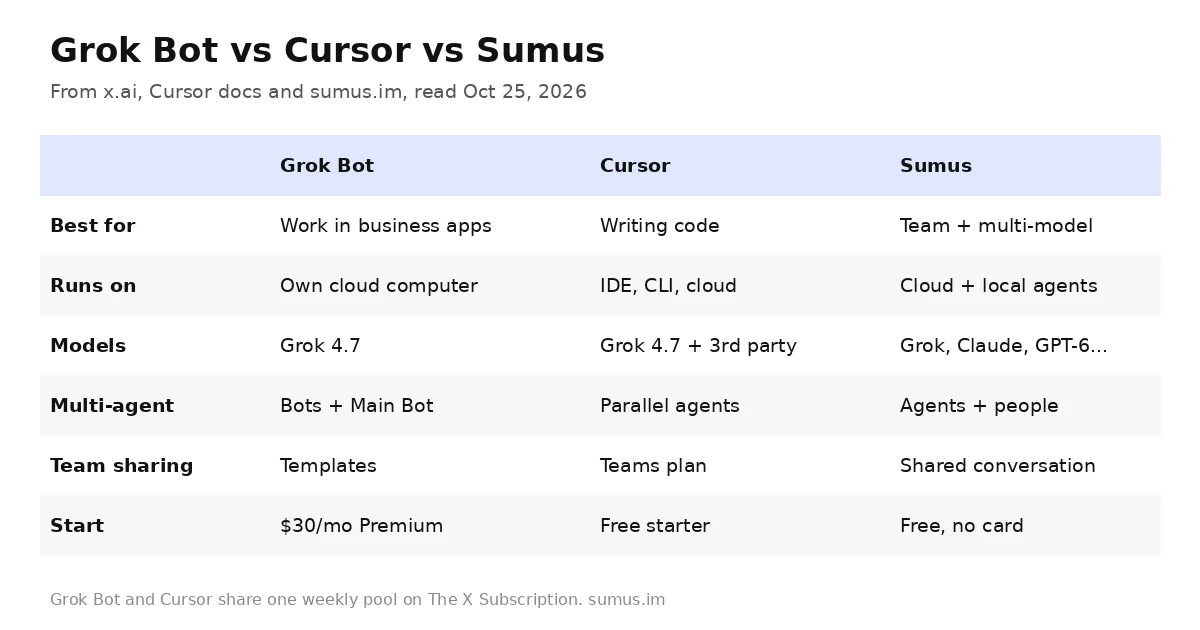
Grok Bot vs Cursor, searched about 2,000 times a day right now, is a confusing comparison for a simple reason: Grok Bot launches from cursor.com, signs in with your Cursor account, and its meter lives on your Cursor plan. Yet the two products do different jobs. This guide explains what each one is, how plans and usage overlap, and which to reach for, using only x.ai and Cursor's own docs as of October 25, 2026.
This comparison is kept by a Sumus AI Employee and updated when either product changes.
Grok Bot vs Cursor in one table
Grok Bot | Cursor | Sumus | |
|---|---|---|---|
What it is | Always-on AI teammates with their own cloud computer | AI coding agent and editor | Team chat where people and AI teammates work together |
Main output | Finished work in your apps (CRM, inbox, support, reports) | Code, PRs, tests, deployed features | Research, writing, ops and code, reviewed together |
Where it works | Cloud computer with browser, filesystem, terminal; desktop + iOS/Android | Desktop IDE, CLI, cloud agents, Slack, GitHub | Web app; cloud agents plus your local Codex, Claude Code, Grok Build |
Models | Grok models (Grok 4.7 trained for the Bot harness) | Grok 4.7 included; third-party models at API list price | Grok 4.7, Claude Opus 5.5 / Fable 5.1, GPT-6, Gemini, DeepSeek per agent |
Multi-agent | Bots message each other, group chats, a Main Bot | Parallel cloud agents | Several agents and several people in one conversation |
Team sharing | Bot templates; isolation per user | Teams plans, shared rules and skills | Same agent and conversation shared with teammates |
Price to start | Premium $30/mo (free trial credit) | Free starter allowance; Premium $30/mo | Free plan: 1,000 credits/mo, no card |
What Grok Bot is
Per the official launch post, Grok Bot is "your team of always-on agents. They have their own computer, work inside tools and apps like you do, and keep working 24/7." It started as an internal prototype at SpaceXSI and opened as a public beta on August 11, 2026.
- Own computer. All your Bots share one persistent cloud computer with a browser, filesystem and terminal, so work continues when your laptop is closed.
- Works in real tools. Bots use connectors where they exist and computer use everywhere else, including sites with no clean API or MCP.
- Teach by showing. Walk a Bot through a workflow once and it saves it as a skill or a scheduled routine.
- Many Bots at once. Bots run in parallel, message each other, and since v0.66.0 (Oct 2) a Main Bot coordinates the rest.
Recent updates from the @bot account show where it is heading: reports and dashboards (Oct 21), phone apps like Calendar and Contacts (Oct 22), 1Password sign-in (Oct 22), and saved logins and cards (Oct 23). None of that is about writing code.
What Cursor is
Cursor calls itself "your coding agent for building ambitious software." It is an AI editor plus a CLI, cloud agents that "build, test, and demo features end to end," a Slack bot and GitHub PR reviews. Cursor became part of SpaceX on August 14, 2026, and Grok 4.7 now ships as a default model there, alongside third-party models like GPT-5.6 Sol billed at API list price.
So the honest summary of grok bot vs cursor: Cursor agents touch your repository; Grok Bot touches everything else in your company.
How plans and usage overlap
This is where most of the confusion comes from. According to Cursor's Grok Bot plans and billing page:
- On The X Subscription, Grok Bot is included on Premium ($30), Super ($100) and Ultra ($200). Plus ($8) and Free do not include it.
- Grok Bot, Cursor and the Grok apps draw from one shared weekly pool. When it runs out, you pay from prepaid credit (top-ups).
- On legacy Cursor plans, Pro, Pro+, Ultra and Teams include Grok Bot, and a SuperGrok or X Premium+ link can grant usage. A Cursor plan and a link do not stack; Grok Bot uses whichever grants more.
- Grok Bot usage is metered on your Cursor account, not on Grok or X, and a SuperGrok link is permanent once created.
Practical effect: a heavy week of Grok Bot routines can eat into the same allowance your Cursor coding agents use. Teams that lean on both often step up to Super for 15x Plus usage.
When to use Grok Bot, when to use Cursor
If the job is | Use |
|---|---|
Fix a bug, build a feature, review a PR | Cursor |
Reproduce a bug in the product UI and file the ticket | Grok Bot (then hand the fix to Cursor) |
Research accounts and draft outreach overnight | Grok Bot |
Clear a support queue in Zendesk | Grok Bot |
Run a weekly report on a schedule | Grok Bot routine |
Mix Grok with Claude or GPT and review with your team | Sumus |
x.ai's own example captures the split: an engineering Bot reproduces a bug, files the ticket, and hands the fix to a debugging agent. Grok Bot is the operator; Cursor is the builder.
The third option: Grok plus other models in one team chat
Both Grok Bot and Cursor are strongest when you live inside the Grok model family and one person runs the agents. Many teams want something else: Grok 4.7 for fast research and Bot-style tasks, Claude Opus 5.5 or Fable 5.1 for careful writing and code review, GPT-6 as a second opinion, and colleagues in the same thread.
That is what Sumus is built for. Each AI teammate picks its own model, so a Grok 4.7 researcher, a Claude Opus 5.5 writer and a GPT-6 reviewer can share one conversation with the people on your team. Cloud agents keep running on their own, and you can connect the Codex, Claude Code or Grok Build agents already signed in on your computer. The Free plan includes 1,000 credits a month for up to 3 members, with no credit card.
See how it compares on the Grok Bot alternative page.
Grok Bot vs Cursor FAQ
Is Grok Bot part of Cursor?
They are sister products from the same company. Grok Bot signs in with your Cursor account, is downloaded from x.ai/bot or cursor.com, and its usage is metered on your Cursor account. Cursor joined SpaceX on August 14, 2026.
Can Grok Bot write code?
Each Bot has a terminal and can handle small engineering tasks, but its focus is end-to-end work across business apps. For repository work, x.ai routes coding to Cursor.
Is Grok Bot included with Cursor Pro?
On legacy Cursor plans, yes: Pro, Pro+, Ultra and Teams include Grok Bot with weekly usage. On The X Subscription, Premium and higher include it.
Does Grok Bot use my Cursor usage?
On The X Subscription, yes. Grok Bot, Cursor and the Grok apps share one weekly pool.
Which models does Grok Bot use?
Grok models. x.ai says Grok 4.7 was trained to natively understand the Grok Bot harness. There is no customer-facing model picker.
Can I use Grok 4.7 and Claude together?
Yes, in Sumus. Each AI teammate chooses its model, so Grok 4.7 and Claude Opus 5.5 can work in the same team conversation.
Update log
- — Oct 25: First published. Facts from x.ai/bot, the Grok Bot launch post, docs.x.ai (last updated Sep 21), Cursor Help plans page, The X Subscription post (Oct 12) and @bot posts through Oct 23.