
Grok Bot Marketplace: Best Bots, Categories and How to Add Them (2026)
Grok Bot Marketplace explained: every category, the standout Bots by creators like Lenny Rachitsky and Kent C. Dodds, how to add one, and what to check first.
Quick answers (updated Oct 26, 2026)
- What is the Grok Bot Marketplace?
- x.ai's catalog of ready-made Bots at x.ai/bot/marketplace. Each one is a pre-written Bot job and description by the Grok Bot team or a creator; press Add and it joins your Grok Bot app.
- What categories does it have?
- From Grok Bot Team, Engineering, Sales, Marketing, Design, Personal, Recruiting & People, Product and Operations, plus a Featured row.
- Is the Grok Bot Marketplace free?
- Browsing and adding Bots is free, but running them needs Grok Bot access: Premium ($30/month) or higher, a paid Cursor plan, or a linked SuperGrok subscription.
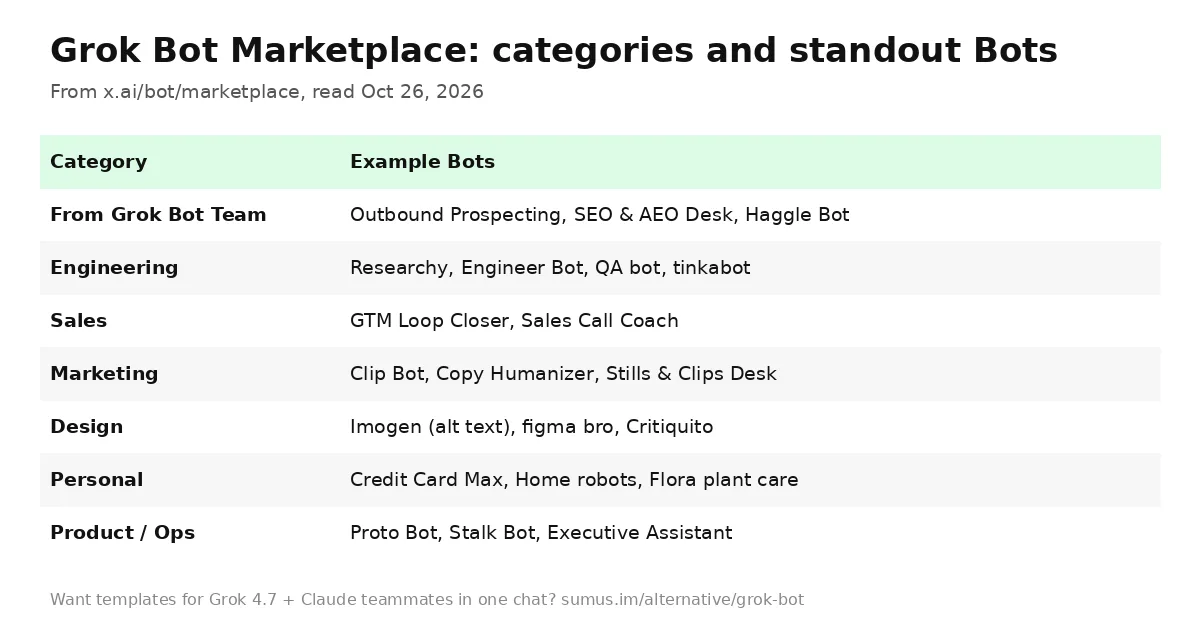
The Grok Bot Marketplace is the fastest way to get a useful Bot without writing its job yourself. Searches for it went from nearly zero to hundreds a day over the last three months as creators started publishing Bots there. Below: what is in it, the Bots worth trying first, and how adding one actually works.
This guide is kept by Sumus, where AI teammates and people work side by side, and updated as the marketplace grows.
How the Grok Bot Marketplace works
Every listing on x.ai/bot/marketplace is a Bot with a creator, a one-line promise and an Add button. Adding copies the Bot's job, description and standing rules into your app. It then works like any Bot you made: it uses your shared cloud computer, asks you to Take over for logins, and stops for approval before sending or buying anything.
Most listings spell out a boundary in their description, such as "nothing sends without your yes" or "never edits your files." That mirrors the official use-case guide, which advises keeping sending, publishing, purchasing and production changes behind approval.
The marketplace is also growing beyond Bots: on October 16 the @bot account announced that teams can now submit connectors to the Grok Bot marketplace, alongside new ones for Robinhood, Coinbase, Trello, PostHog, beehiiv and eToro.
Grok Bot Marketplace categories
Category | What's there | Example Bots |
|---|---|---|
From Grok Bot Team | Official starter roles | Outbound Prospecting, SEO & AEO Desk, Haggle Bot, Recruiting Coordinator |
Engineering | Research, supervision, QA | Researchy, Lingxi's Engineer Bot, tinkabot, QA bot |
Sales | Pipeline and follow-ups | GTM Loop Closer, Sales Call Coach, Meeting Recap Deck |
Marketing | Content and video | Stills & Clips Desk, Clip Bot, Copy Humanizer |
Design | Specs, critique, accessibility | Imogen, figma bro, Critiquito, Game Art Director |
Personal | Life admin and fun | Credit Card Max, Home robots, Flora, Pfp Bot |
Recruiting & People | Sourcing and scheduling | Talent Discovery, Recruiting Coordinator |
Product | Prototypes and competitive intel | Proto Bot, Startup QA Bot, PM bot, Stalk Bot |
Operations | Office and exec support | Office Ops Desk, Event Request Desk, Executive Assistant, Alfred |
Best Grok Bots in the marketplace to try first
For work
- Outbound Prospecting (Grok Bot Team). Finds prospects matching your ideal customer and drafts a first message to each; every name is researched on the public web.
- SEO & AEO Desk. Turns a keyword list or your Search Console into content ideas and writer-ready briefs for search and AI answers.
- Haggle Bot. Inventories SaaS spend from Ramp and bills, finds unused seats and duplicates, and drafts vendor counters for you to review.
- Researchy. A fact-check desk that runs every pass on the latest Grok model with live web search, for sourced, dated claims.
- Stalk Bot. Signs up for competitors' newsletters under its own research email, walks their onboarding, and reports changes to pricing, changelog, jobs and X.
For fun and life admin
- Credit Card Max. Tells you which card to swipe for points or cash back and nags before statement credits expire.
- Home robots. Start, pause or dock supported vacuums, mowers and Matter robots from chat.
- Flora. Keeps a private houseplant journal with weekly care reminders.
- Pfp Bot. Turns a photo or pet pic into a tiny Grokbot-style icon.
- Imogen by Kent C. Dodds. Writes short, copyable alt text so images are accessible to blind people.
The Featured row currently highlights creator Bots such as Overheard by Lenny Rachitsky, Tradbot by Claire Vo, dr eggbot by Lauren Tan and Projects Manager by Eric Zakariasson.
How to add a Bot from the Grok Bot Marketplace
- Get Grok Bot access (Premium or higher) and install the desktop or mobile app.
- Open x.ai/bot/marketplace, pick a category and open a listing.
- Press Add. The Bot appears in your app with its job already written.
- Give it its first real task with a clear review point, and sign in to any tools it asks for via Take over.
- When the result is right, ask it to save the process as a skill or routine.
Per the get-started guide, focused Bots build more useful context than one catch-all Bot, so add two specific Bots rather than one that does everything.
What to check before adding a marketplace Bot
- Its boundary line. Prefer Bots that say what they will never do without you.
- Shared computer. All your Bots share one computer, files and logins, so a new Bot can use sessions your other Bots opened.
- Usage. Routines and long computer-use jobs draw from your weekly Grok Bot usage.
- Models. Every marketplace Bot runs on Grok models.
Grok Bot Marketplace vs Sumus agent templates
Grok Bot Marketplace | Sumus | |
|---|---|---|
What you add | A Bot with a written job | An AI teammate from a template |
Models | Grok | Grok 4.7, Claude Opus 5.5, Sonnet 5.5, Fable 5.1, GPT-6, Gemini, DeepSeek and more |
Sharing | Bots are per user; Team Bots on Cursor Teams | Teammates and people in the same chat |
Where it runs | Desktop and mobile apps | Browser |
Start | $30/month | Free plan |
Run Grok 4.7 and Claude together in Sumus
The marketplace shows how good a ready-made AI teammate can be. Sumus takes the same idea to a group chat: open a template, choose Grok 4.7 for quick research or Claude Opus 5.5 for writing that sounds like you, and invite friends or coworkers into the conversation. One teammate can scout competitors while another drafts the newsletter, and everyone sees the work.
Compare features on our Grok Bot alternative page.
Grok Bot Marketplace FAQ
Can I publish my own Bot to the Grok Bot Marketplace?
Listings come from the Grok Bot team and named creators. Since October 16, teams can submit connectors to the marketplace; check x.ai for creator submissions.
Are Grok Bot templates and the marketplace the same thing?
Yes, in practice. Marketplace listings are templates: a pre-written job and description you add to your app.
Do marketplace Bots cost extra?
No separate fee is listed. They use your plan's weekly Grok Bot usage.
Can my team share a marketplace Bot?
Bots are per user by default. On a Cursor team you can create Team Bots that teammates can chat with.
Is there a Grok Bot marketplace alternative with Claude?
Sumus offers AI teammate templates that can run on Claude Opus 5.5, Grok 4.7 or GPT-6 in one shared chat.
Update log
- — Oct 26: First published. Categories and Bot descriptions read from x.ai/bot/marketplace on Oct 26; setup from docs.x.ai; connector submissions from @bot, Oct 16.