
Grok Bot Download: Mac, Windows, Linux, iPhone and Android (2026)
Grok Bot download guide: the official installers for Mac (Apple silicon or Intel), Windows, Linux, iPhone and Android, plan you need, setup steps and fixes.
Quick answers (updated Oct 26, 2026)
- Where do I download Grok Bot?
- From the official page x.ai/bot. It offers the macOS app (Apple silicon), and the docs list Intel Mac, Windows x64/Arm64 and Linux builds under More downloads. Mobile apps are on the App Store and Google Play.
- Is the Grok Bot download free?
- The app is free to install, but using it needs an eligible plan: Premium ($30/month), Super ($100) or Ultra ($200), a paid Cursor plan, or a linked SuperGrok subscription.
- Which version do I need?
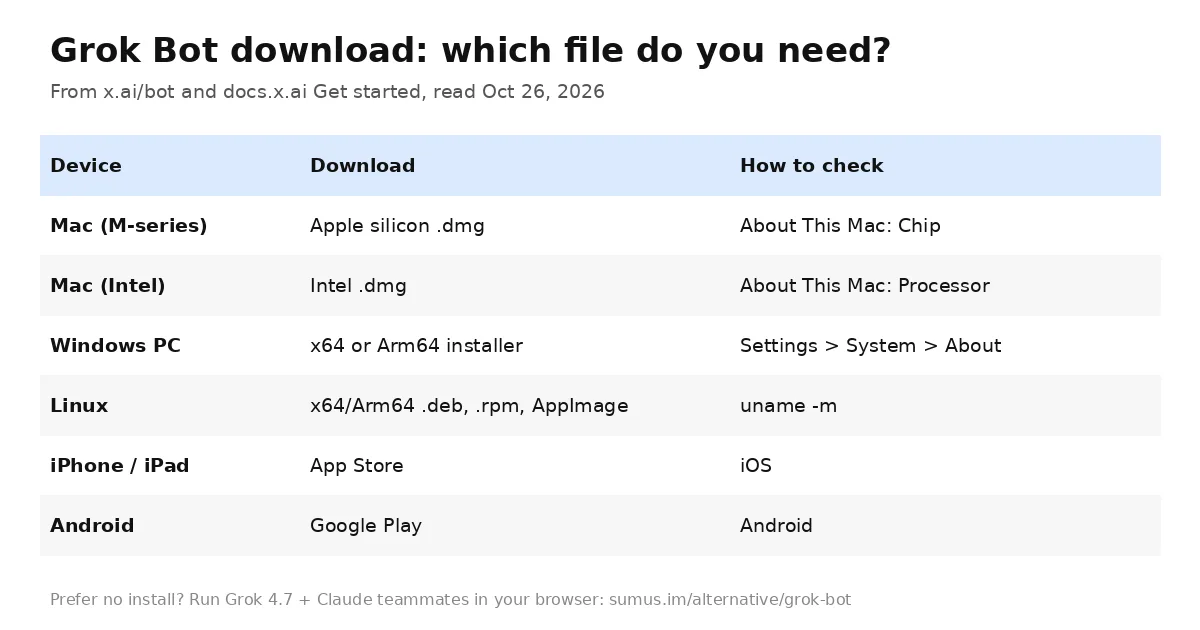
- Mac: Chip = Apple silicon, Processor = Intel. Windows: check System type for x64 or Arm64. Linux: run uname -m (x86_64 = x64, aarch64 = Arm64).
Grok Bot download searches jumped this month as SpaceXAI kept shipping weekly updates to its AI teammates app. The good news: there is one official source, and installing takes about two minutes. Here is exactly which file to grab, how to set it up, and what to do if it won't start.
This guide is kept by Sumus, where AI teammates and people work side by side, and updated as Grok Bot ships.
Official Grok Bot download links
Always download from x.ai/bot. The page's main button serves the macOS Apple silicon build directly from Cursor's update server (Grok Bot uses your Cursor account), and other builds live under More downloads. Avoid third-party "Grok Bot APK" or mirror sites: the real app updates itself and signs in through Cursor, so a repackaged file buys you nothing and risks your logins.
Platform | File | Notes |
|---|---|---|
macOS Apple silicon | Disk image (.dmg) | Default button on x.ai/bot |
macOS Intel | Disk image (.dmg) | Under More downloads |
Windows | x64 or Arm64 installer | Opens from the Start menu |
Linux | x64/Arm64 .deb, .rpm or AppImage | Published with every stable release |
iPhone and iPad | App Store | Action Button voice chat on iPhone 15 Pro+ |
Android | Google Play | Phone apps like Calendar and Contacts since Oct 22 |
How to install Grok Bot on Mac
- Open About This Mac. A Chip field means Apple silicon; a Processor field means Intel.
- Download the matching disk image and open it.
- Drag Grok Bot to Applications.
- Open it; if macOS asks for confirmation, choose Open.
How to install Grok Bot on Windows
- Check Settings > System > About > System type for x64 or Arm64.
- Run the matching installer.
- Open Grok Bot from the Start menu.
How to install Grok Bot on Linux
Run uname -m. Install the .deb (Debian, Ubuntu) or .rpm (Fedora, RHEL) with your package manager, or make the AppImage executable and run it. The app checks for updates automatically, and Settings > Updates has a manual check.
Grok Bot app for iPhone and Android
The mobile app reaches the same Bots as desktop. On October 19 the @bot account showed you can set it as your iPhone's Action Button (version 1.16, iPhone 15 Pro or later) and press to talk. On October 22 it gained access to Calendar, Reminders, Contacts and other phone apps on iOS and Android.
After the download: first-time setup
- Sign in. Choose Sign in, finish authentication in the browser and return. If your access comes from SuperGrok, link it under Settings > Usage & Billing > Get Access with Grok.
- Meet your first Bot. Computer setup runs in the background and the app opens a chat with a Bot named Grok Bot.
- Give it one job. Name its role and boundaries, for example "investigate product-performance questions, never change production settings, remember this."
- Sign in to your tools. When it hits a login, press Take over, enter the password or 2FA yourself, then I'm done. The Bot never sees the password, and the session is shared with your other Bots.
A tip from the official guide: start with a five-minute task that needs no login, like summarizing an attached document with every date and decision cited, before letting it into your apps.
What you need before you download
Requirement | Detail |
|---|---|
Plan | Premium $30/mo, Super $100/mo or Ultra $200/mo; or any paid individual Cursor plan, Cursor Teams, or a linked SuperGrok / SuperGrok Plus / Heavy |
Account | A Cursor account (SSO works for organizations) |
Privacy setting | Cloud data storage required; Legacy Privacy Mode must be switched first |
Internet | Bots work on a cloud computer, so tasks keep running with your laptop closed |
Grok Bot download not working? Quick fixes
- App won't start or computer stuck setting up: fully quit and reopen; the docs say this clears most setup problems.
- Blocked at start-up: your Cursor account may be on Legacy Privacy Mode. Change it in Cursor privacy settings.
- "No access" after signing in: you have the free app but no eligible plan, or SuperGrok isn't linked yet. On mobile, tap Link Grok Account, then Finished Linking? Refresh My Status.
- Wrong architecture error: re-download the Intel/Apple silicon or x64/Arm64 build that matches your machine.
Grok Bot download vs. a browser-based alternative
Grok Bot | Sumus | |
|---|---|---|
Install | Desktop + mobile apps | Nothing; runs in the browser |
Models | Grok models | Grok 4.7, Claude Opus 5.5, Sonnet 5.5, Fable 5.1, GPT-6, Gemini, DeepSeek and more |
Who's in the chat | You and your Bots | Your AI teammates and your colleagues together |
Price to start | $30/month | Free plan with monthly credits |
Run Grok 4.7 and Claude together in Sumus
Some people searching for a Grok Bot download just want Grok-powered help without installing anything or buying another subscription. Sumus gives you AI teammates in the browser: pick Grok 4.7 for a fast researcher, Claude Opus 5.5 for a careful writer, and let them work in the same conversation with your friends or team. Hand them a trip plan, a weekly report or a side project, and they pick it up from there. You can still connect local agents like Claude Code or Codex when a job needs your own machine.
See how it stacks up on our Grok Bot alternative page.
Grok Bot download FAQ
Is there a Grok Bot download for Windows?
Yes. Windows x64 and Arm64 installers are available from x.ai/bot under More downloads.
Can I download Grok Bot on Linux?
Yes. x64 and Arm64 builds ship as .deb, .rpm and AppImage with every stable release.
Is the Grok Bot app the same as the Grok app?
No. The Grok app is the chat assistant. Grok Bot is a separate app for AI teammates that work on their own cloud computer and sign in to your tools.
Does Grok Bot work on iPad?
Yes. The mobile app runs on iPhone, iPad and Android.
Do I need to keep my computer on?
No. Bots run on a cloud computer, so closing your laptop or phone doesn't stop a task or routine.
Can I use Grok without downloading anything?
Yes. In Sumus, Grok 4.7 teammates run in your browser, alongside Claude and GPT-6, on a free plan.
Update log
- — Oct 26: First published. Based on x.ai/bot, docs.x.ai Get started (updated Oct 22) and Overview, and @bot posts from Oct 19 and Oct 22.