
Grok Bot Use Cases: 12 Real Examples With Starter Prompts (2026)
Grok Bot use cases that work: 8 official roles with starter prompts from x.ai's docs, real results like 204 tickets in 10 minutes, personal uses and setup tips.
Quick answers (updated Oct 26, 2026)
- What are the best Grok Bot use cases?
- Roles that own a repeatable outcome: sales outbound research, candidate sourcing, paid-media monitoring, expense reconciliation, performance investigations, bug reproduction, account health and a chief-of-staff digest. These are the eight roles in x.ai's official guide.
- What can Grok Bot do that a chatbot can't?
- It works on its own cloud computer with a browser, files and terminal, signs in to your apps, runs 24/7 while your laptop is closed, and repeats a workflow on a schedule after you show it once.
- How should I start?
- With read-and-prepare work that ends at a review point, such as "draft, don't send." Add approved actions or a routine only after the output is reliable.
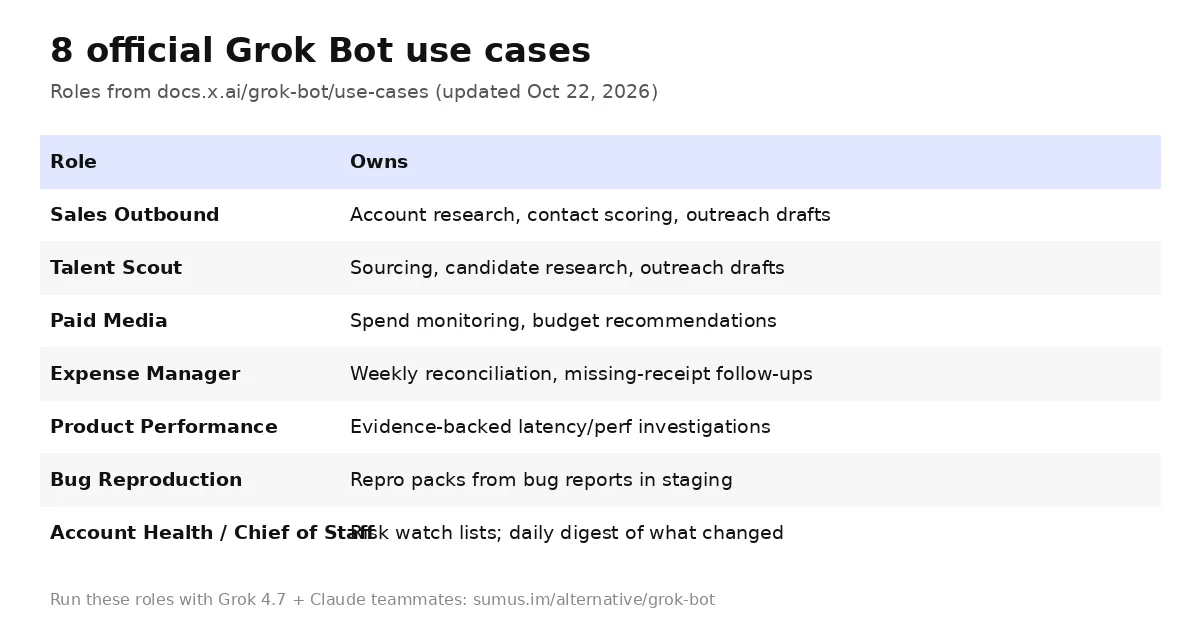
The best Grok Bot use cases have one thing in common, according to x.ai's own guide: a Bot should "own a repeatable outcome, not a loose category of questions." Below are the eight official roles with condensed starter prompts, four everyday uses from the marketplace, real results SpaceXAI has shared, and how to turn any of them into a Bot that runs on its own.
This guide is kept by Sumus, where AI teammates and people work side by side, and updated as Grok Bot ships.
8 official Grok Bot use cases for work
Each prompt below is shortened from the Grok Bot use-case docs. Every one ends at a review point on purpose.
1. Sales Outbound
Owns: account research, contact prioritization and review-ready outreach.
Starter prompt: "Research the 25 accounts in this CRM view, score them against our ICP and recent intent, find up to three contacts each, and draft email and LinkedIn outreach in my style. Skip anyone in an active sequence. Return a review list; don't send."
2. Talent Scout
Owns: sourcing, candidate research and outreach drafts.
Starter prompt: "Find 20 candidates who meet the must-haves for this role, exclude anyone in our ATS, explain the evidence for each, and draft outreach in my voice. Don't contact anyone."
3. Paid Media
Owns: campaign monitoring and budget recommendations.
Starter prompt: "Pull spend and performance by campaign, compare with budget and target CAC, recommend reallocations with numbers, and draft a Slack update. Don't change budgets."
4. Expense Manager
Owns: weekly reconciliation and missing-information follow-ups.
Starter prompt: "Build this week's expense summary, match receipts from the finance inbox, flag policy exceptions and draft one follow-up per owner. Don't send or change reimbursements."
5. Product Performance
Owns: evidence-backed performance investigations.
Starter prompt: "Investigate the checkout latency increase since yesterday's release using dashboards, traces and flamegraphs. Return the top hotspot with screenshots and links, facts separate from hypotheses."
6. Bug Reproduction
Owns: turning bug reports into reproduction packs.
Starter prompt: "Reproduce this bug in staging with a fresh test account. Return exact steps, expected vs actual behavior, screenshots, browser details and a minimal test case. No production data."
7. Account Health
Owns: risk and expansion signals across customers.
Starter prompt: "Combine usage, support escalations, renewal timing and stakeholder activity into a ranked watch list with evidence and a next step for each. Don't contact customers or edit the CRM."
8. Chief of Staff
Owns: a source-linked digest of what changed.
Starter prompt: "Review activity since yesterday across my channels, inbox, calendar and notes. Return only items tied to my priorities, with source, why it matters, next step and whether I owe a decision."
4 everyday Grok Bot use cases
Grok Bot isn't only for the office. The Grok Bot Marketplace has a Personal category with Bots like these:
- 9. Credit card optimizer. Credit Card Max picks the card to swipe for points or cash back and tracks expiring statement credits.
- 10. Home robots. Start, pause or dock supported vacuums and mowers from chat.
- 11. Plant care. Flora keeps a houseplant journal and weekly reminders.
- 12. Voice errands on the go. Since October 19, iPhone 15 Pro owners can set Grok Bot as the Action Button and just talk; since October 22 it can use your phone's Calendar, Reminders and Contacts.
Real Grok Bot results so far
- Support incidents. On October 20 the @bot account said SpaceXAI uses Grok Bot to spot incidents in its support queue; in one incident it cleared 204 tickets in about 10 minutes, with one engineer approving the batch.
- Speed. On October 16, computer tasks began finishing 3x sooner on average.
- Living documents. Since October 21 a Bot can build reports, memos and dashboards and keep them up to date.
These are vendor-reported numbers, so treat them as a ceiling for well-scoped jobs.
Grok Bot use cases by plan and effort
Use case | Setup effort | Good first routine | Main risk |
|---|---|---|---|
Chief of Staff digest | Low | Daily morning digest | Noise until tuned |
Sales Outbound | Medium | Nightly research to a review list | Sending without approval |
Expense Manager | Medium | Weekly summary | Totals not reconciling |
Bug Reproduction | Medium | On new issues | Test credentials in chat |
Paid Media | Medium | Daily spend check | Budget changes |
How to turn a use case into a durable Bot
- Put the job, source systems, output format and boundaries in the Bot description.
- Run one real task with a safe scope.
- Correct the result until it's reviewable.
- Save the process as a skill.
- Test it on a second input.
- Create a routine only when retries and failure cases are defined.
- Keep consequential external actions behind approval.
Grok Bot vs Sumus for these use cases
Grok Bot | Sumus | |
|---|---|---|
Models | Grok models | Grok 4.7, Claude Opus 5.5, Sonnet 5.5, Fable 5.1, GPT-6, Gemini and more |
Who works together | You and your Bots | AI teammates and your people in one chat |
Runs | Desktop and mobile apps, cloud computer | Browser, plus your local agents |
Price to start | $30/month | Free plan |
Run Grok 4.7 and Claude together in Sumus
Most of these use cases get better with two kinds of strength: speed for gathering and judgment for writing. In Sumus, a Grok 4.7 teammate can research accounts or pull the week's numbers while a Claude Opus 5.5 teammate writes the outreach or the digest, and your coworkers or friends review it in the same thread. Use it for a club newsletter, a trip plan or a sales list; the teammates don't mind.
See the full comparison on our Grok Bot alternative page.
Grok Bot use cases FAQ
What can Grok Bot do?
Multi-step work across apps and websites: research, drafting, reconciling, reproducing bugs, monitoring, building reports and dashboards, and running routines on a schedule, while checking with you before consequential actions.
Can Grok Bot send emails for me?
Yes, with access, but x.ai recommends keeping sending, publishing and purchasing behind approval. Drafts you approve are the default pattern.
Is Grok Bot good for coding?
It can supervise engineering work (for example, the marketplace's Engineer Bot launches cloud agents and watches PRs), but hands-on coding is Cursor's job.
Can Grok Bot run tasks on a schedule?
Yes. Save a workflow as a skill, then create a routine; it runs on the cloud computer even when your laptop is closed.
Where can I run these use cases with Claude?
In Sumus, where Claude Opus 5.5 and Grok 4.7 teammates can share one chat with your people.
Update log
- — Oct 26: First published. Roles and prompts condensed from docs.x.ai use cases (updated Oct 22); personal Bots from x.ai/bot/marketplace; results from @bot posts Oct 16–22.