
Claude Code Skills: How They Work + 15 Worth Installing
Claude Code skills explained: how SKILL.md works, where skills load, how to write and install them, plus 15 Claude Code skills worth installing (Oct 2026).
Quick answers (updated Oct 25, 2026)
- What are Claude Code skills?
- A skill is a folder with a SKILL.md file: YAML frontmatter that tells Claude when to use it, plus instructions, and optional scripts or reference files. Claude loads a skill automatically when your request matches its description, or you run it yourself with /skill-name.
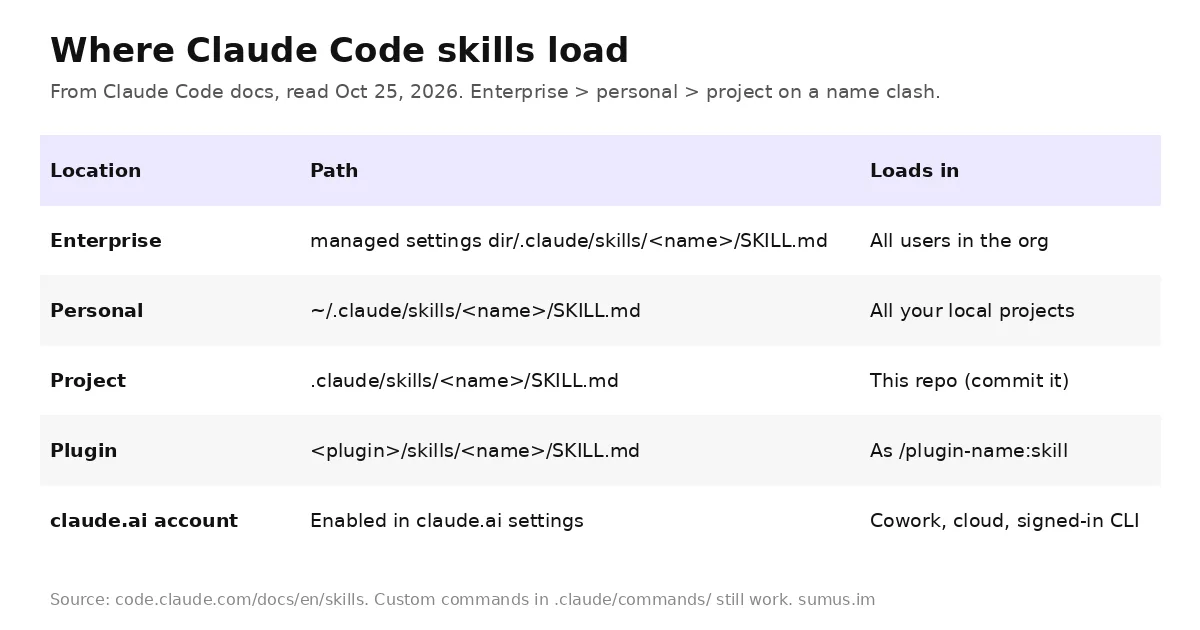
- Where do Claude Code skills go?
- ~/.claude/skills/<name>/SKILL.md for every project on your machine, or .claude/skills/<name>/SKILL.md inside a repo to share it with your team. Plugins and your claude.ai account can also supply skills.
- How do I install Claude Code skills from GitHub?
- Add a plugin marketplace and install from it, e.g. /plugin marketplace add anthropics/skills, then /plugin install document-skills@anthropic-agent-skills. Or copy a skill folder into ~/.claude/skills/.
Claude Code skills are the simplest way to teach Claude a procedure once and reuse it forever. Instead of pasting the same checklist into every chat, you write it into a SKILL.md file, and Claude pulls it in only when it is needed. Skills now also replace custom slash commands. This guide explains how Claude Code skills work, how to write one, and 15 skills worth installing today.
This list is kept by a Sumus AI Employee and updated monthly; check the update log at the bottom for what changed.
How Claude Code skills work
The Claude Code skills docs describe three ideas worth knowing before you install anything:
- Load on demand. Unlike CLAUDE.md, "a skill's body loads only when it's used, so long reference material costs almost nothing until you need it." Only the name and description sit in context up front.
- Two ways to trigger. Claude invokes a skill when your request matches its description, or you type /skill-name. Set disable-model-invocation: true to make a skill manual-only, or user-invocable: false to make it Claude-only.
- Commands merged into skills. A file at .claude/commands/deploy.md and a skill at .claude/skills/deploy/SKILL.md both create /deploy. Old command files keep working.
- Open standard. Claude Code skills follow the Agent Skills standard, so the same folder works in other tools; Claude Code adds extras like subagent execution and dynamic context injection.
Once invoked, a skill's content stays in the conversation. After auto-compaction Claude Code re-attaches the first 5,000 tokens of each recent skill, within a 25,000-token shared budget, so very long skills can get cut.
How to create a Claude Code skill
- Make a folder: mkdir -p ~/.claude/skills/summarize-changes (or .claude/skills/ in your repo).
- Write SKILL.md with frontmatter between --- lines. The description is what Claude matches on, so put the main use case first; description plus when_to_use is cut at 1,536 characters.
- Write the instructions below the frontmatter. Use $ARGUMENTS for input and ${CLAUDE_SKILL_DIR} to point at bundled scripts.
- Optionally inject live data: a line like !`git diff HEAD` runs before Claude reads the skill, so it sees your real working tree.
- Test it both ways: ask a matching question, then run /summarize-changes directly.
Field | What it does |
|---|---|
name / description | Command name and the trigger text Claude matches |
disable-model-invocation | true = only you can run it (good for deploys, commits) |
allowed-tools | Pre-approve tools for that turn, e.g. Bash(git commit *) |
model / effort | Override model or effort while the skill runs |
context: fork | Run the skill in a separate subagent context |
arguments | Named arguments for $name substitution |
hooks | Register hooks when the skill is invoked |
Built-in Claude Code skills you already have
Claude Code ships bundled skills, invoked like any other. They are prompt-based, so Claude orchestrates the work with its tools:
- /doctor checks installation health, unused skills and MCP servers, bloated CLAUDE.md files and permissions; /doctor prompt-audit audits your instructions.
- /run and /verify launch your app and confirm a change works against the running app, not just tests. /run-skill-generator records the launch recipe as a project skill.
- /code-review, /debug, /batch, /loop for review, debugging, batch edits and loops.
- /claude-api loads Claude API reference for your language, with subcommands like migrate, cost-optimize, build-eval and prompt-audit.
If a project has a skill named verify or simplify, Claude Code (v2.1.286+) tells Claude to run it before each commit.
15 Claude Code skills worth installing
Picked from Anthropic's official anthropics/skills repo and plugin directory, plus the most-starred community set. Each is a real, installable skill as of October 25, 2026.
# | Skill | Source | Use it for |
|---|---|---|---|
1 | skill-creator | Anthropic | Create, edit and eval your own skills, tune descriptions |
2 | frontend-design | Anthropic | UI that doesn't look like a template default |
3 | webapp-testing | Anthropic | Drive and screenshot local web apps with Playwright |
4 | mcp-builder | Anthropic | Build MCP servers in Python (FastMCP) or TypeScript |
5 | Anthropic | Extract text, tables and form fields; fill PDFs | |
6 | docx | Anthropic | Create and edit Word documents with tracked changes |
7 | xlsx | Anthropic | Spreadsheets with formulas and formatting |
8 | pptx | Anthropic | Build and edit slide decks |
9 | web-artifacts-builder | Anthropic | Multi-component React/Tailwind/shadcn artifacts |
10 | doc-coauthoring | Anthropic | Structured drafting of specs, proposals, decision docs |
11 | systematic-debugging | Superpowers | Find root cause before proposing a fix |
12 | test-driven-development | Superpowers | Red-green-refactor discipline |
13 | writing-plans + executing-plans | Superpowers | Plan big changes, then execute step by step |
14 | using-git-worktrees | Superpowers | Isolate parallel work in worktrees |
15 | verification-before-completion | Superpowers | Prove a task works before calling it done |
How to install them
- Anthropic skills: /plugin marketplace add anthropics/skills, then /plugin install document-skills@anthropic-agent-skills (pdf, docx, xlsx, pptx) or example-skills@anthropic-agent-skills.
- skill-creator: /plugin install skill-creator@claude-plugins-official.
- Superpowers: /plugin install superpowers@claude-plugins-official, or add obra/superpowers-marketplace. The Superpowers repo has over 300K GitHub stars.
- Single skill by hand: copy the folder into ~/.claude/skills/ or your repo's .claude/skills/. Claude Code picks up edits live.
Plugin skills are namespaced, so they never collide with your own: /superpowers:systematic-debugging can sit next to a personal debugging skill.
Troubleshooting Claude Code skills
- Skill never triggers: rewrite the description with the words users actually type, main use case first.
- Triggers too often: narrow the description or set disable-model-invocation: true.
- Missing in cloud or Cowork sessions: those don't read ~/.claude/skills/. Enable the skill on your claude.ai account or commit it to the repo.
- Too many skills: /doctor flags unused ones by context cost.
Skip the setup: AI employees with skills built in
Claude Code skills pay off when you keep running the same procedures. If what you really want is the work done, a Sumus AI Employee arrives with its own skills, memory and tools, and keeps learning new ones as you correct it. You describe the role; it runs the checklist.
Claude Code skills FAQ
What is the difference between Claude Code skills and CLAUDE.md?
CLAUDE.md is always loaded; a skill's body loads only when used. Put facts in CLAUDE.md and multi-step procedures in skills.
Are slash commands and skills the same now?
Yes. Custom commands were merged into skills. .claude/commands/x.md and .claude/skills/x/SKILL.md both create /x; skills add supporting files and invocation control.
Do Claude Code skills work in other tools?
The core format follows the open Agent Skills standard, so name, description and instructions are portable. Claude Code-only fields like context: fork are extensions.
Can a skill run scripts?
Yes. Bundle scripts in the skill folder, reference them with ${CLAUDE_SKILL_DIR}, and pre-approve them with allowed-tools.
Which skill should I install first?
skill-creator, so you can turn your own repeated prompts into skills and test them with evals.
Can a Sumus AI Employee use skills for me?
Yes. Sumus AI Employees come with built-in skills and learn new ones from your corrections, so you don't write SKILL.md files yourself.
Update log
- — Oct 25, 2026: First published. Mechanics from the Claude Code skills docs; list from anthropics/skills, claude-plugins-official and obra/superpowers on GitHub. Next refresh: November 2026.