
Claude Code Projects: Run Parallel Threads From One Chat
Claude Code Projects run one coordinating chat that starts parallel cloud threads with shared memory. How they work, setup, Pro/Max limits and when to use them.
Quick answers (updated Oct 24, 2026)
- What are Claude Code Projects?
- Claude Code Projects turn one ongoing conversation into a coordinator. You describe the work, and Claude starts parallel threads, each a full cloud session on its own branch, that report back and keep running after you close your laptop.
- Who can use Claude Code Projects?
- Projects are in public beta on Pro and Max plans and rolling out gradually, starting with accounts that use cloud sessions. They aren't offered on Team or Enterprise yet. You can join the waitlist.
- Where do Claude Code Projects run?
- At claude.ai/code, in the Code tab of the Claude desktop app and in the Claude mobile app. Not in the terminal CLI, VS Code or JetBrains.
- Do Projects use more of my plan?
- Yes. Each thread is a full session and several run at once, so a project draws on the same plan limits faster than a single session. The enforced cap is 200 new threads per day.
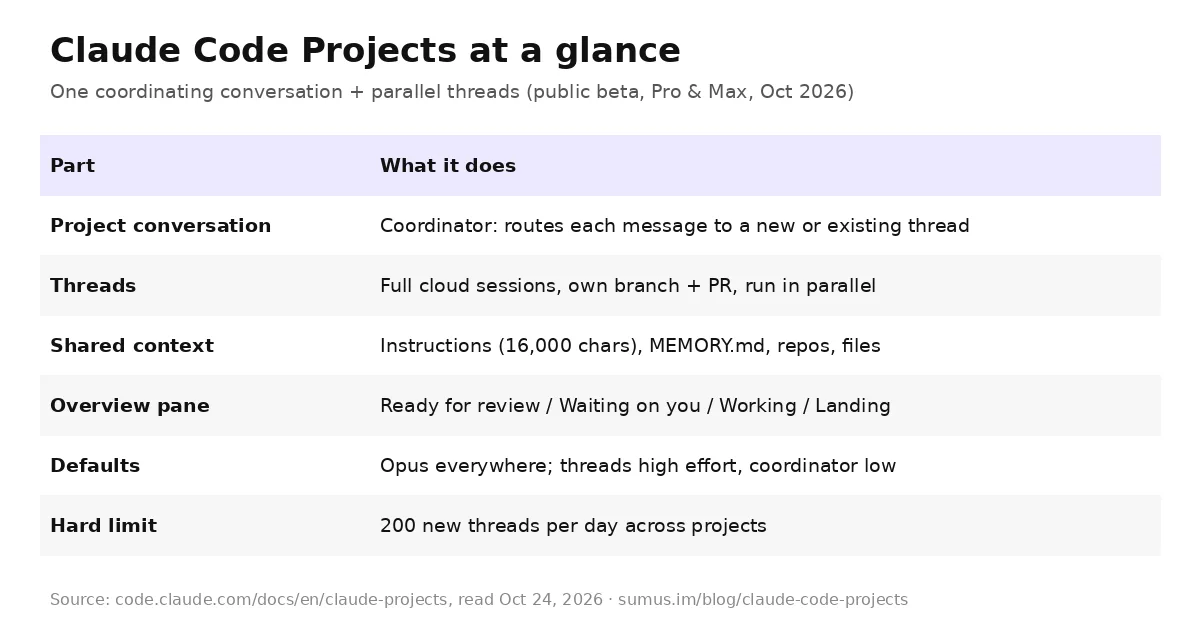
Claude Code Projects let you brief Claude once and have it run a stream of related work as parallel threads. Anthropic announced the redesign on September 17, 2026: "Projects now run from one conversation, starting in Claude Code. You describe what needs doing, and Claude directs parallel threads that keep working after you close your laptop" (@claudeai on X). The full reference lives in Let Claude coordinate ongoing work with Projects.
This guide explains how Claude Code Projects are organized, how to set one up, what it costs on Pro and Max, and when another Claude Code option fits better. This page is kept by a Sumus AI Employee.
How Claude Code Projects work
Without a project, running several sessions means coordinating them yourself: deciding what each one works on, repeating the same background in each, and checking back to see which finished. A project moves that job to Claude. It has four parts:
- The project conversation. One long-running session where Claude acts as coordinator. It answers quick questions in place, starts a new thread for new work, or passes a follow-up to the thread already working in that area. It sees what threads report, not every step.
- Threads. The workers. Each is a separate cloud session with its own context window, works on its own branch, and opens a pull request when the work calls for one. Open threads then watch the PR with auto-fix: they push fixes when CI fails and address review comments.
- Shared context. Every new thread starts with the project's repositories and files, project instructions (up to 16,000 characters), project memory stored as a MEMORY.md index, the CLAUDE.md in each repo, your claude.ai connectors and a cloud environment.
- The Overview pane. Threads grouped as Ready for review, Waiting on you, Working, Landing, Idle and Resolved, plus Library, Pull requests and Scheduled tasks tabs.
Anthropic's announcement describes the pitch in one line: brief Claude in the project "the way you'd brief a chief of staff." You can send several unrelated tasks in one message and each becomes its own thread, then steer any of them from your phone.
How to start a Claude Code project
- Check the prerequisites: a Pro or Max plan with Projects in the sidebar (or under More), code on github.com, and the Claude GitHub App installed on the repositories with push access.
- At claude.ai/code or the desktop Code tab, open Projects and select New project. Only a name is required; add an optional one-line goal such as "Hold p95 API latency under 200 ms" and the repositories most tasks need.
- Or convert existing work: in a cloud session's sidebar menu choose Move to project, then Continue as new project, and Claude proposes the setup.
- Write project instructions before the first batch: which branch to target, how a thread checks its work, what needs your go-ahead.
- Send one small real task first, review how the thread reports back, then send the batch.
Need a local database, an emulator or an API behind your VPN? Ask Claude to run that one thread on your computer with Work locally. It connects through Remote Control (Claude Code v2.1.280 or later) while the other threads stay in the cloud.
What Claude Code Projects are good for
- One goal across many repos. "Bring every service up to the new lint config": a thread per repository, each with its own PR.
- An area you keep feeding. Paste bugs and stack traces for one service as they arrive; pitfalls you ask Claude to remember go into project memory.
- A build or migration bigger than a session. "Move the app off the deprecated ORM" splits into threads that each take a part.
- Work that isn't code. Upload contracts or a support-ticket export and ask recurring questions; write-ups land in the Library.
Claude Code Projects vs subagents, agent view and workflows
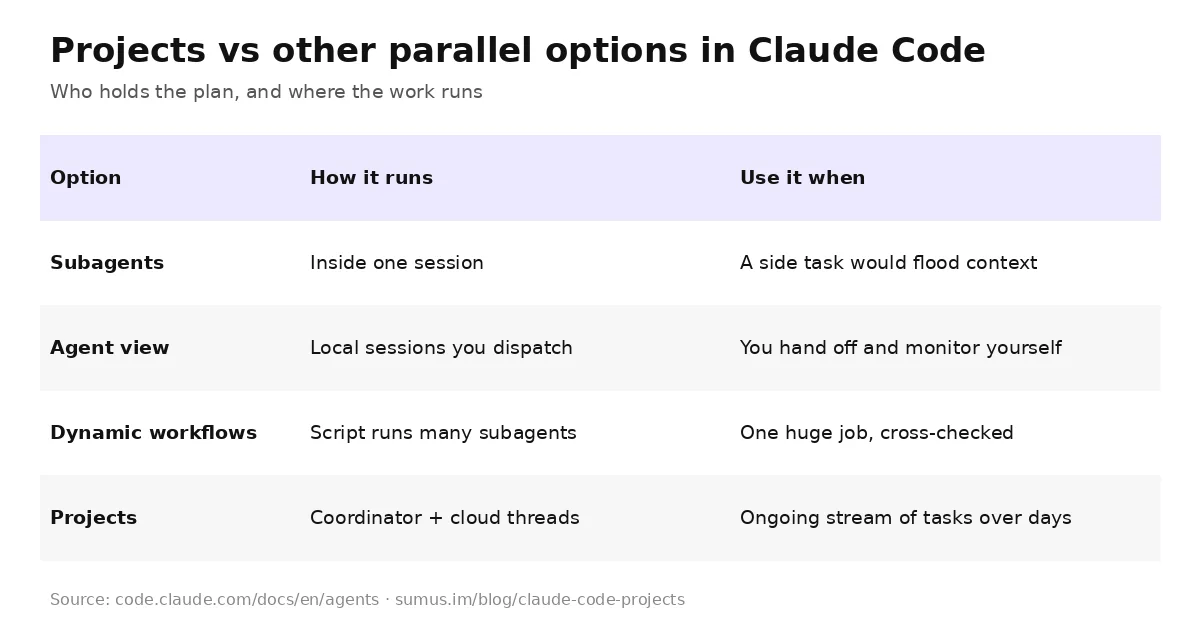
Running in parallel isn't what makes a project. The difference is who starts and tracks the sessions. A dynamic workflow (what ultracode triggers) attacks one huge job with a script; a project handles an ongoing stream of tasks over days or weeks. One-off tasks still fit a plain cloud session, and work that always needs your machine fits a local session or agent view.
Usage, cost and limits
- Projects count against the same plan limits as other Claude Code sessions and use them faster; on Pro, expect to hit your limit sooner on project days.
- Usage comes from running threads, the coordinator reading reports, and idle threads that wake when CI fails or a review comment lands.
- A thread that hits your limit waits and continues on its own after the reset. Work only goes past your limits if you turned on usage credits.
- New projects run Opus everywhere at high thread effort. Choose a smaller Thread model or lower effort in Project settings > General to save usage, and check Project settings > Usage for spend by thread.
- Reviving a thread idle longer than the one-hour cache re-reads its whole conversation; a fresh thread can be cheaper.
Limitations to know
- A project belongs to one user; you can't share it or its threads. No organization controls during the beta.
- Cloud threads don't pick up skills, .claude/settings.json or .mcp.json from your repos or your local setup.
- If a cloud sandbox can't resume, the thread restarts from a fresh clone and uncommitted changes can be lost, so ask Claude to commit and push often.
- Threads can't be moved between projects, and two projects can't be merged.
Where Sumus fits
The idea behind Claude Code Projects, one chat dispatching parallel agent threads, is how Sumus works by default. A Sumus AI Employee sits in your team's group chat, takes tasks in plain words from anyone on the team, splits them into parallel agent threads and reports back where everyone can review, on models like Claude Opus 5.5 and Fable 5.1.
What we're watching
- Projects reaching Team and Enterprise plans and all Pro and Max accounts.
- Existing claude.ai chat and Cowork projects being upgraded to the new experience.
- Local thread support getting broader beyond Remote Control.
Claude Code Projects FAQ
Are Claude Code Projects the same as claude.ai Projects?
No. The earlier claude.ai and Cowork Projects group chats and files. Claude Code Projects add a coordinator and parallel threads. Old projects keep working until the redesign reaches them.
How many threads can a Claude Code project run?
There's no fixed concurrency number; Claude starts as many as the work needs. The enforced limit is 200 new threads per day, and you can ask it to run at most two or three at a time.
Can I use Claude Code Projects from the terminal?
No. Projects run at claude.ai/code, in the desktop app and in the mobile app, not in the CLI or IDE extensions. A thread can run on your machine via Remote Control.
Do threads open pull requests automatically?
A thread opens a PR when you ask, and can open one on its own for a concrete fix. It then watches the PR with auto-fix on. Change this in the task or project instructions.
Does an idle project use my plan?
No. A project with no running threads, no watched pull requests and no new messages doesn't use your plan, and neither does an archived one.
Can a Sumus AI Employee run parallel coding threads for me?
Yes. A Sumus AI Employee takes coding tasks in your team chat, runs them as parallel agent threads and reports back with results the whole team can review.
Update log
- — Oct 24: First published from Anthropic's Claude Code Projects docs, the Sep 17 announcement and @claudeai's launch thread.