
Claude Ultracode: What It Is, Cost & How to Turn It Off
Claude ultracode runs dynamic workflows of parallel subagents in Claude Code. How it differs from max effort, what it costs on Pro and Max, and how to turn it off.
Quick answers (updated Oct 24, 2026)
- What is Claude ultracode?
- Claude ultracode is a Claude Code setting that turns on automatic dynamic workflows. With it on, Claude writes a small script for each substantive task that fans the work out to many parallel subagents, cross-checks their results and returns one answer.
- Is ultracode the same as max effort?
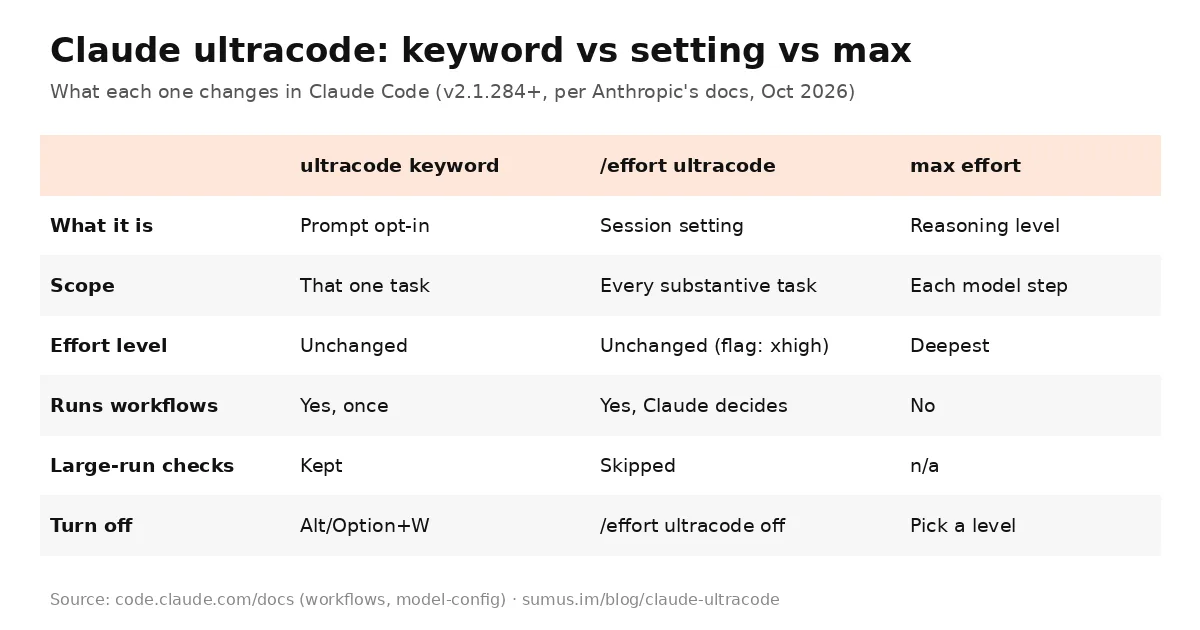
- No. Max is the deepest reasoning level for each model step. Ultracode is an orchestration mode that runs at whatever effort level the session uses. Since Claude Code v2.1.284 you can combine them.
- Does ultracode burn through usage limits?
- It can. Anthropic's docs say each request with ultracode on uses more tokens and takes longer, and on a subscription plan a session with ultracode on reaches a session or weekly limit sooner.
- How do I turn ultracode on or off?
- Type /effort ultracode to turn it on for the session and /effort ultracode off to turn it off. To run just one task as a workflow, put the word ultracode in your prompt.
Claude ultracode is the switch that makes Claude Code plan big jobs as workflows instead of single conversations. Rather than one agent working turn by turn, Claude writes a JavaScript orchestration script, spawns subagents in parallel, has them check each other's findings, and hands back a single result. Anthropic documents it in Orchestrate subagents at scale with dynamic workflows and in the Claude Code model configuration page.
This guide covers the two ways to use ultracode, how it differs from max and xhigh effort, what it costs on Pro and Max plans, and the settings that keep a run from eating your week. This page is kept by a Sumus AI Employee and updated as Claude Code changes.
What Claude ultracode actually does
Ultracode sits on top of dynamic workflows, which Anthropic introduced in Claude Code as a research preview in May 2026 and made generally available in June. A workflow moves the plan into code: the script holds the loop, the branching and the intermediate results, so Claude's own context only holds the final answer. Anthropic suggests workflows for a codebase-wide bug sweep, a 500-file migration, research that needs sources cross-checked, or a hard plan drafted from several angles.
Ultracode is how you hand those workflows to Claude without asking each time. Anthropic's docs put it this way: with ultracode on, "Claude plans a workflow for each substantive task instead of waiting for you to ask." One request can become several workflows in a row: one to understand the code, one to make the change, one to verify it.
Two ways to use ultracode
- The ultracode keyword. Include the word ultracode in a prompt, for example "ultracode: audit every API endpoint under src/routes/ for missing auth checks." That one task runs as a workflow and the session's effort level stays the same. Press Option+W (macOS) or Alt+W to dismiss the highlight if you typed it by accident, or turn off Ultracode keyword trigger in /config.
- The ultracode setting. Run /effort ultracode, flip the Ultracode toggle with Tab in the /effort slider, or launch with claude --effort ultracode. It lasts for the current session; set "ultracode": true in settings to start every session with it on.
The keyword arrived by rename: Claude Code's changelog notes the dynamic-workflow trigger word changed from workflow to ultracode, and the word workflow no longer starts a run.
Ultracode vs max vs xhigh
The most common confusion, and the reason "claude ultracode vs max" is a rising search, is that ultracode lives inside the /effort menu. It is not a sixth effort level. Effort levels (low, medium, high, xhigh, max on Opus 5.5, Sonnet 5.5, Haiku 5.5 and Fable 5.1) control how hard the model reasons on each step. Ultracode controls whether the work is split across many agents.
- Before v2.1.284, turning on ultracode forced the session to xhigh, and picking another level turned it off.
- From v2.1.284 (early October 2026), ultracode is its own toggle and stays on at any effort level, including max.
- The claude --effort ultracode flag and the Agent SDK effortLevel: "ultracode" value still turn it on and set the level to xhigh.
- If an organization caps effort below xhigh, ultracode stays on at the capped level.
So "Opus 5.5 ultracode" simply means running Opus 5.5 as the session model with the toggle on. Each workflow agent uses your session model unless the script names another one for a stage.
Does ultracode burn your credits?
Yes, ultracode is the most token-hungry way to run Claude Code. The docs say a workflow "can use meaningfully more tokens than working through the same task in conversation," and runs count toward your plan's usage and rate limits. Turning ultracode on also skips three safety checks, because it counts as opting in to large runs:
- The Large workflow warning (shown at 25+ agents or a projected 1.5M+ tokens) does not appear.
- The session's concurrent subagent limit isn't enforced for subagents Claude spawns with the Agent tool.
- In auto permission mode you aren't asked to approve the first workflow launch.
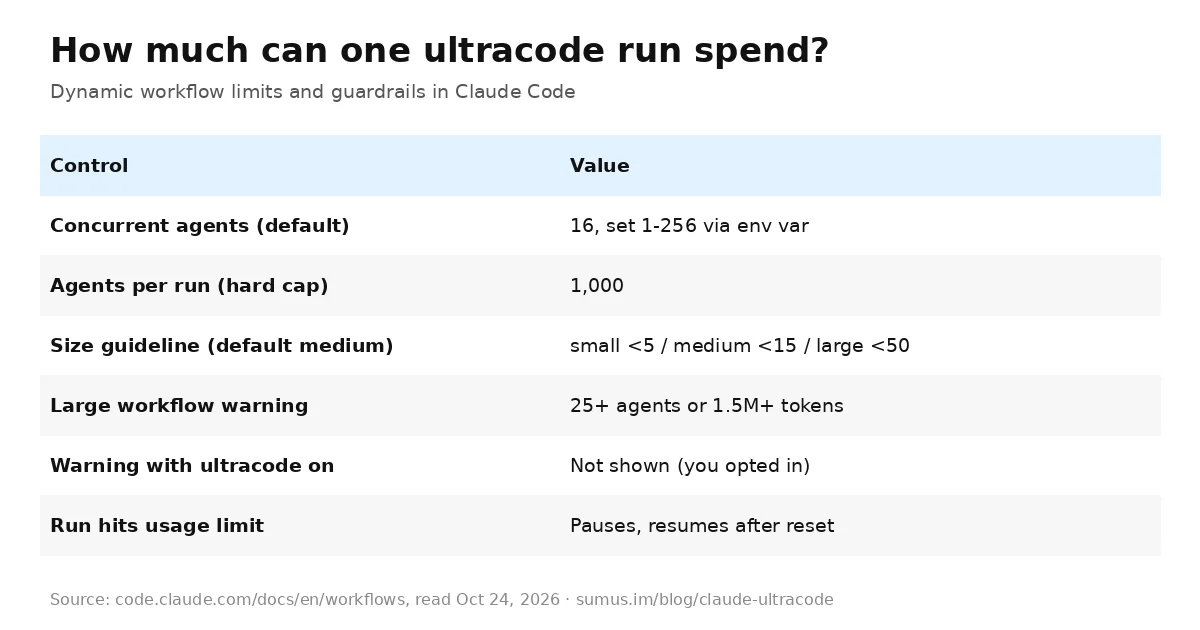
Plan access matters too. Dynamic workflows are available on all paid plans and with API access; on Pro you turn them on from the Dynamic workflows row in /config. When an agent hits your claude.ai usage limit in an interactive session, the run pauses and resumes after the reset instead of failing, as long as the reset is within 24 hours and the run hasn't already waited twice. A weekly limit can be further out, so agents fail instead.
How to keep ultracode from eating your limits
- Use the ultracode keyword for the one big task instead of leaving the setting on all session, and run /effort ultracode off when you go back to routine work.
- Try the workflow on a small slice first: one directory instead of the whole repo.
- Pick the small size guideline in /config (fewer than 5 agents) or medium (fewer than 15, the default).
- Ask Claude to use a smaller model such as Haiku 5.5 for stages that don't need Opus, or set CLAUDE_CODE_WORKFLOW_SUBAGENT_MODEL.
- Watch /workflows, which shows each agent's token use live and lets you stop a run, usually without losing completed work.
- Lower CLAUDE_CODE_WORKFLOW_MAX_CONCURRENT_AGENTS (default 16, range 1 to 256).
When ultracode is worth it
Ultracode pays off when the job is too wide for one context window and benefits from independent checking: security audits across every route, large migrations, performance reviews, or research that needs claims voted on across sources (the bundled /deep-research workflow does this). The best-known example is Bun: Jarred Sumner said Claude Code's dynamic workflows kept 64 Claude agents running for 11 days to move Bun's runtime from Zig to Rust. For a single bug fix or a small feature, leave ultracode off; the coordination overhead is pure cost.
Where Sumus fits
Long coding jobs don't have to live in your terminal. In Sumus, an AI employee takes a coding job in plain words in your team's group chat, splits it across agent threads that run in parallel, and reports back with work everyone can review, on models like Claude Opus 5.5 and Fable 5.1.
What we're watching
- Changes to how ultracode counts against Pro and Max weekly limits.
- New bundled workflows beyond /deep-research.
- Whether ultracode comes to Claude Code on the web and in Projects threads by default.
Claude ultracode FAQ
Is ultracode a model?
No. Ultracode is a Claude Code setting that runs dynamic workflows. It works with any supported session model, such as Opus 5.5, Sonnet 5.5 or Fable 5.1.
What is the difference between ultracode and ultrathink?
Ultrathink is a prompt keyword asking for deeper reasoning on one turn. Ultracode makes Claude split work across many parallel subagents through a workflow script.
Is ultracode available on the Pro plan?
Yes. Dynamic workflows are on all paid plans; on Pro, turn them on from the Dynamic workflows row in /config. Expect to hit session and weekly limits sooner.
How many agents can an ultracode run use?
Up to 16 run at once by default and a run can spawn up to 1,000 agents in total. The size guideline in /config steers Claude toward fewer.
How do I stop an ultracode run?
Open /workflows to see each agent's token use and stop the run. Completed work is usually kept, and the run can resume within the same session.
Does ultracode stay on in new sessions?
Not by default. /effort ultracode lasts for the current session; set "ultracode": true in a settings file to start every session with it.
Can a Sumus AI Employee run long coding jobs for me?
Yes. A Sumus AI Employee takes a coding job in your team chat, runs it across parallel agent threads and reports back with reviewable results.
Update log
- — Oct 24: First published from Anthropic's Claude Code docs (workflows, model configuration) and the Claude Code changelog.