
Claude Code MCP: Setup, Best Servers & New MCP Tasks
Claude Code MCP setup in one command: claude mcp add for HTTP, stdio and JSON servers, scopes, the best MCP servers, and the new MCP Tasks beta (v2.1.304+).
Quick answers (updated Oct 24, 2026)
- What is Claude Code MCP?
- Claude Code MCP is Claude Code's support for the Model Context Protocol, the open standard that connects Claude Code to external tools and data: GitHub, databases, Sentry, Notion, Stripe and hundreds more. Each MCP server adds tools Claude can call from your terminal session.
- How do I add an MCP server to Claude Code?
- Run claude mcp add. For a remote server: claude mcp add --transport http notion https://mcp.notion.com/mcp. For a local one: claude mcp add db -- npx -y @bytebase/dbhub. Then run /mcp inside Claude Code to check the connection and sign in.
- What are MCP Tasks in Claude Code?
- MCP Tasks let a server run a long job, such as a build or report export, in the background. Claude's tool call returns as soon as the server accepts the job, Claude keeps working, and the result arrives when it finishes. It is in public beta in the Claude Code CLI from v2.1.304.
Claude Code MCP turns Claude Code from a coding assistant into an agent that can act on your real systems. Add a server with one command and Claude can open GitHub PRs, query Postgres, read Sentry errors or update Notion without you copying anything between windows. This week the protocol got a big upgrade inside Claude Code: MCP Tasks, which let slow tools run on the server while Claude keeps working. Everything below comes from the official Claude Code MCP docs.
This guide is kept by a Sumus AI Employee and updated when Claude Code's MCP support changes.
How to set up Claude Code MCP
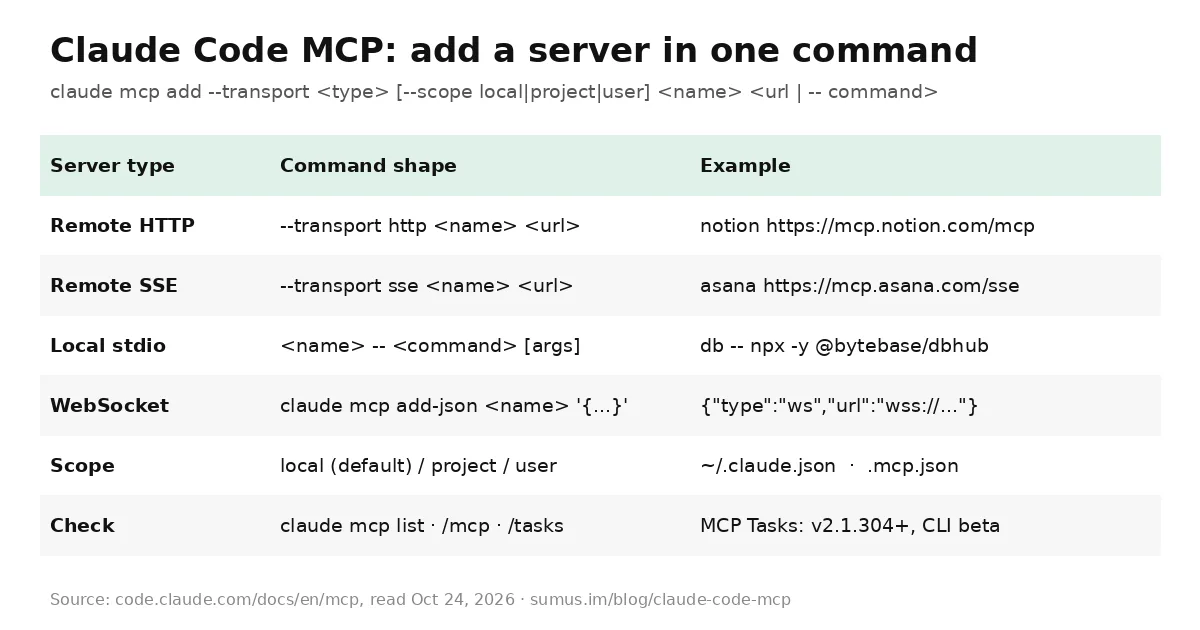
Every Claude Code MCP server is added with claude mcp add. Pick the shape that matches your server's setup instructions:
Remote HTTP server (recommended)
claude mcp add --transport http notion https://mcp.notion.com/mcp
Most hosted servers use HTTP. Claude Code also accepts streamable-http as an alias in JSON config, and if a server only speaks SSE, Claude Code (v2.1.265+) falls back to SSE automatically.
Local stdio server
claude mcp add --env AIRTABLE_API_KEY=YOUR_KEY airtable -- npx -y airtable-mcp-server
Everything after the double dash is the command that launches the server, passed through untouched. Claude Code's own flags (--transport, --env, --scope) go before it.
From another client's JSON
claude mcp add-json example '{"command":"npx","args":["-y","@example/mcp-server"]}'
If a server's README only shows a Claude Desktop or Cursor mcpServers block, pass the inner object to add-json. WebSocket servers (type ws) are added this way too.
Claude Code MCP scopes
Scope | Loads in | Shared with team | Stored in |
|---|---|---|---|
local (default) | Current project | No | ~/.claude.json |
project | Current project | Yes, via git | Project-root .mcp.json |
user | All your projects | No | ~/.claude.json |
Use --scope project and commit .mcp.json to give the whole team the same servers; teammates approve project servers the first time they run claude. Keep secrets out of git with ${VAR} expansion, which supports defaults like ${API_URL:-https://api.example.com}.
Check, authenticate and manage
- claude mcp list / get <name>: see each server's status, including Pending approval and failure details such as a 401.
- /mcp: inside a session, sign in to OAuth servers, reconnect, or toggle a server off without deleting it. /mcp reconnect all retries every failed server.
- claude mcp remove <name>: delete a server.
- Connectors from claude.ai: if you log in with a claude.ai account, connectors you added at claude.ai appear in Claude Code automatically.
Best MCP servers for Claude Code
Start with first-party servers run by the company that owns the data. These are the ones Anthropic's own docs use as examples; you can browse more reviewed connectors in the Anthropic Directory.
Server | What Claude can do | Add command |
|---|---|---|
GitHub | Review PRs, open issues, read repos | claude mcp add --transport http github https://api.githubcopilot.com/mcp/ (with a PAT header) |
Sentry | Read errors and stack traces in production | claude mcp add --transport http sentry https://mcp.sentry.dev/mcp |
PostgreSQL (DBHub) | Query your database in plain English | claude mcp add db -- npx -y @bytebase/dbhub --dsn "postgresql://..." |
Notion | Read and update specs and docs | claude mcp add --transport http notion https://mcp.notion.com/mcp |
Stripe | Look up customers, payments and subscriptions | claude mcp add --transport http stripe https://mcp.stripe.com |
Asana | Read and update tasks | claude mcp add --transport sse asana https://mcp.asana.com/sse |
Claude Security | List, fix and resolve security findings | Connector in claude.ai, synced to Claude Code (Enterprise) |
Don't worry about installing too many. Claude Code MCP tool search is on by default: only tool names load at session start and full definitions load when Claude needs them, so there is no fixed per-server tool cap. The practical limit is your context window.
What's new: MCP Tasks in Claude Code
MCP Tasks come from the MCP Tasks extension in protocol revision 2026-07-28. Anthropic's David Soria Parra announced Claude Code support at MCPCon North America on Oct 22, 2026, and Claude Code docs now list it as a public beta in the CLI.
- Answer now, finish later. A server that supports tasks accepts a long job and returns a task ID. Claude keeps working, and the footer shows a count like 1 MCP task.
- Follow it in /tasks. Select a task and press x to stop it. When it ends, the transcript shows "MCP task ... completed" and the result goes to Claude; if Claude is idle, it starts on it unprompted.
- Survives exit. A task on a remote server keeps running after you quit. Run claude --resume on the same session and Claude Code picks it up again.
- Can ask you questions. A task can open an elicitation dialog (a form or a sign-in link) when it needs input. Close /tasks to see it.
Requirements for MCP Tasks
- Claude Code v2.1.304 or later, in the terminal CLI, Agent SDK or GitHub Actions. The VS Code extension and desktop app don't have it yet.
- A server that supports tasks, connected over HTTP, stdio or a claude.ai connector on protocol revision 2026-07-28.
- The call comes from the main conversation, not a subagent. One-shot claude -p runs don't get tasks.
- Not on third-party providers such as Amazon Bedrock, or with feature-flag fetching turned off.
Separately, any MCP tool call in the main conversation that runs past two minutes now moves to a background task automatically, even on servers without task support. Those don't survive exiting the session.
Claude Code MCP tips and limits
- Startup timeout. MCP_TIMEOUT=10000 claude gives servers 10 seconds to start.
- Output size. Claude Code warns when an MCP tool returns over 10,000 tokens and caps output at 25,000 by default. Raise it with MAX_MCP_OUTPUT_TOKENS=50000.
- Use MCP prompts. Servers' prompts show up as slash commands such as /mcp__github__list_prs.
- Reference resources. Type @ to pull an MCP resource into your prompt.
- Run Claude Code as a server. claude mcp serve exposes Claude Code's own tools to other MCP clients.
Where Sumus fits
Claude Code MCP connects one developer's terminal to tools. Someone still has to keep those connections useful for the team: watch Sentry overnight, triage new GitHub issues, check the Stripe dashboard after a release and write it up. A Sumus AI Employee does that kind of standing work in your team's group chat, running on models like Claude Opus 5.5.
What we're watching
- MCP Tasks reaching the VS Code extension and desktop app.
- Which popular servers add task support first.
- MCP Tasks leaving public beta.
Claude Code MCP FAQ
Where does Claude Code store MCP config?
Local and user scope servers live in ~/.claude.json. Project scope servers live in .mcp.json at the project root, which you can commit to share with your team.
How do I add an MCP server to all projects in Claude Code?
Add --scope user, for example claude mcp add --scope user --transport http notion https://mcp.notion.com/mcp.
How do I authenticate a Claude Code MCP server with OAuth?
Add the server, then run /mcp in Claude Code and choose the server to sign in through your browser. From a shell you can also run claude mcp login <name>.
Can I import MCP servers from Claude Desktop?
Yes. Run claude mcp add-from-claude-desktop and pick the servers to import, or copy each server's JSON into claude mcp add-json.
Do MCP Tasks work in the Claude Code VS Code extension?
Not yet. MCP Tasks are in public beta for the terminal CLI, Agent SDK and GitHub Actions on Claude Code v2.1.304 or later.
How many MCP servers can Claude Code use?
There is no fixed cap. Tool search defers tool definitions until needed, so the practical limit is your context window.
Can a Sumus AI Employee run my dev tools for me?
Yes. A Sumus AI Employee can triage issues, watch errors after deploys and post summaries to your team chat on a schedule.
Update log
- — Oct 24: First published with setup, scopes, server list and MCP Tasks (public beta, Claude Code v2.1.304+), from the Claude Code MCP docs read the same day.