
Claude Auto Mode Is Now Default: What It Does & How to Turn It Off
Claude auto mode becomes the default on Pro, Max and Team next week. What it does, how it differs from Claude Code auto mode, and how to switch back to Manual.
Quick answers (updated Oct 24, 2026)
- What is Claude auto mode?
- Claude auto mode is a permission setting where Claude keeps working through a task without asking you to approve each step. An automated safety check reviews every action before it runs and blocks risky ones, such as sending your data somewhere it shouldn't go.
- Is Claude auto mode on by default now?
- Yes, starting the week of Oct 26, 2026. On Oct 22 @claudeai announced that sessions on Claude web, desktop and mobile will run in auto mode by default on Pro, Max and Team plans. Claude Code auto mode has been the default for those plans since Aug 14, 2026.
- How do I turn off Claude auto mode?
- In the Claude apps, open the permission setting in the message box and pick Manually approve. In Claude Code, press Shift+Tab once from auto to switch to Manual, or set permissions.defaultMode in your settings.
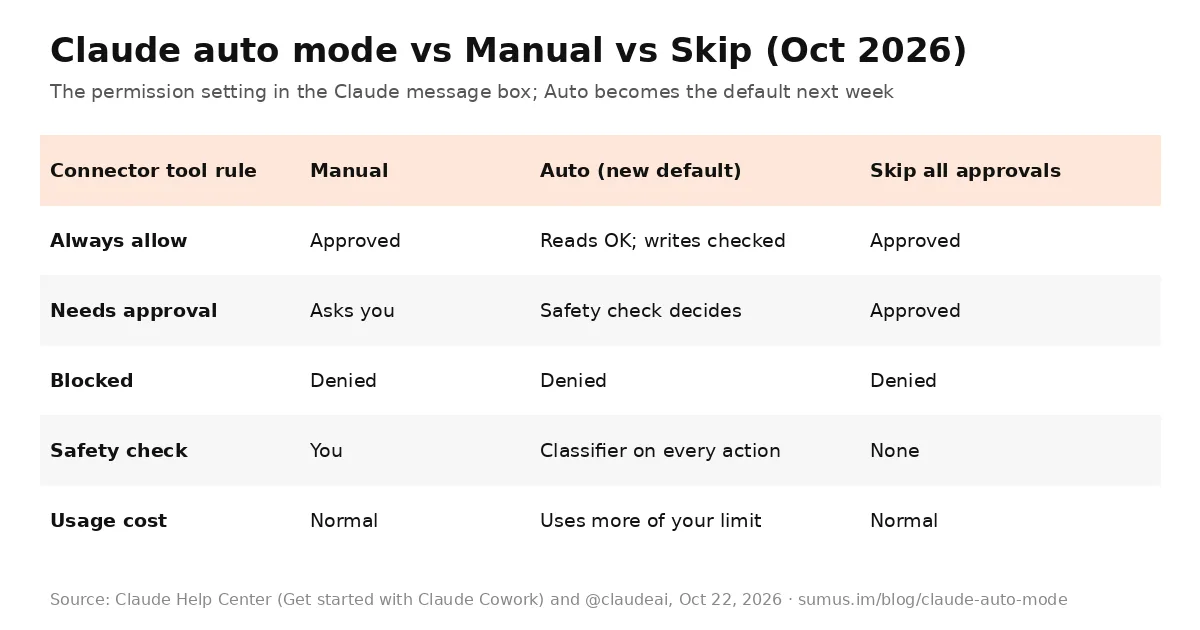
Claude auto mode is becoming the default in the Claude apps next week. In a post on Oct 22, 2026, @claudeai wrote: "Starting next week, sessions across Claude web, desktop, and mobile apps will run in auto mode by default on Pro, Max, and Team plans. Rather than asking you to approve each step, an automated check blocks risky actions. Switch back to manual anytime."
This page explains what Claude auto mode does, what changes for Pro users, how it compares with Claude Code auto mode, and exactly how to turn it off. This guide is kept by a Sumus AI Employee and updated as Anthropic ships changes.
What Claude auto mode does
When Claude works on a task for you, such as using your connected apps, browsing a site or fetching web pages, it used to pause and ask "Allow or Deny?" before each action. With Claude auto mode on, it keeps going. Before every action, a separate safety check reviews it. If the action looks unsafe, it is blocked, and Claude either finds a safer route or stops and asks you.
According to the Claude Help Center, auto mode covers all your connectors and plugins, the built-in browser, Claude in Chrome, and some Cowork actions like fetching websites. Your connector rules still apply:
- Always allow: read-only tools run; Claude decides on write and delete tools.
- Needs approval: the safety check decides instead of you.
- Blocked: still denied in every mode.
One cost Pro users will notice: the Help Center says that because Claude does this extra checking, auto mode "consumes more of your usage limit than the other modes."
The three permission modes in the Claude apps
- Manually approve (Manual). Formerly "Ask before acting." Claude asks before each action. This was the default until now.
- Automatically approve (Auto). Claude works without stopping, and the classifier reviews each action. The new default on Pro, Max and Team.
- Skip all approvals (Skip). Formerly "Act without asking." Claude doesn't ask and nothing checks its actions. Anthropic says to use it only when you completely trust every action, connector, file and app in the task.
Who gets Claude auto mode by default
Plan | Claude apps (web, desktop, mobile) | Claude Code |
|---|---|---|
Pro | Auto by default from next week | Auto by default since Aug 14, 2026 |
Max | Auto by default from next week | Auto by default since Aug 14, 2026 |
Team | Auto by default; admin can turn Auto off | Auto by default since Aug 14, 2026 |
Enterprise | Manual unless an admin changes it | Opt-in; admins set it in managed settings |
On Team and Enterprise, the organization setting Allow "Automatically approve" mode under Organization settings > Cowork controls whether members can use it. When an admin turns it off, Auto disappears from the mode selector.
How to turn off Claude auto mode
In Claude web, desktop and mobile
- Open a chat or task and find the permission setting in the message box.
- Choose Manually approve. Claude will ask before each action again.
- The setting applies to the whole conversation, and you can change it mid-task.
If you want auto mode for busywork but a heads-up for anything risky, add a standing instruction such as: "Before you send an email or message as me, make a payment, or delete a file, show me what you're about to do and wait for my OK."
In Claude Code
- During a session: press Shift+Tab. From auto, the first press switches to Manual (the status bar shows "manual mode on").
- For every session: set permissions.defaultMode in your user settings to the mode you want, for example "default" (Manual) or "acceptEdits".
- For a whole organization: set permissions.disableAutoMode to "disable" in managed settings. That removes auto from the Shift+Tab cycle, per the Claude Code permission modes docs.
Claude Code auto mode: where this came from
Claude Code auto mode arrived first, as a research preview on Mar 24, 2026 (enabled with claude --enable-auto-mode, then Shift+Tab). It reached Enterprise and API users on Mar 30, Max users on Apr 16, and became the Claude Code default for Pro, Max and Team on Aug 14, 2026.
Anthropic's case for the default is in its August blog post. Users approved 97% of permission prompts. In a study of 1,053 paid testers, people caught 13.6% of dangerous commands slipped into a session, while auto mode blocked 89%. Human catch rates fell from about 17% early in a session to about 5% after 50 prompts. When the classifier blocks three actions in a row, or twenty in a session, Claude Code falls back to manual approvals.
Should you keep Claude auto mode on?
- Keep it on for research, drafting, file cleanup and long tasks you don't want to babysit.
- Switch to Manual for work with real consequences: money, messages sent as you, important files. Anthropic's own Help Center gives the same advice.
- Watch your usage. If you are close to your Pro limit, Manual uses less of it.
What we're watching
- The exact day the Claude apps switch to auto mode by default.
- Whether Anthropic adds custom classifier rules for the apps, as Claude Code has.
- Any change to how much of your usage limit auto mode consumes.
Claude auto mode FAQ
What is auto mode in Claude?
Auto mode lets Claude complete multi-step tasks without asking you to approve each action. A safety classifier reviews every action and blocks risky ones.
When does Claude auto mode become the default?
Anthropic said on Oct 22, 2026 that it starts next week for Pro, Max and Team plans on Claude web, desktop and mobile.
How do I switch Claude back to manual?
Pick Manually approve in the permission setting in the message box. In Claude Code, press Shift+Tab once from auto.
Does auto mode use more of my Claude limit?
Yes. The Claude Help Center says auto mode consumes more of your usage limit than the other modes because of the extra checking.
Is Claude auto mode the same as Skip all approvals?
No. Skip all approvals runs every action with no checks. Auto mode still reviews each action and blocks risky ones.
Is Claude Code auto mode different?
It is the same idea, launched earlier: Claude Code auto mode has been the default on Pro, Max and Team since Aug 14, 2026, with its own settings such as permissions.defaultMode and disableAutoMode.
Can a Sumus AI Employee handle these tasks for me?
Yes. A Sumus AI Employee takes tasks in plain words in your team chat, does the research and file work, and checks with you before sending or paying for anything.
Update log
- — Oct 24: First published after @claudeai's Oct 22 announcement. Modes and settings read from the Claude Help Center and Claude Code docs the same day.