MOSS-Image: OpenMOSS's 5B Text-to-Image Model for Readable Text
MOSS-Image is OpenMOSS's open 5B text-to-image model: 96.3% long-text coverage, #2 behind GPT Image 2 in blind tests, Apache-2.0. How to run it.
Quick answers
- What is MOSS-Image?
- MOSS-Image is an open-weight text-to-image model family from OpenMOSS (Fudan University, SII, MOSI). It is a 5B diffusion transformer trained from scratch, built for long bilingual text rendering and JSON layout control. It was released in mid-October 2026.
- Is MOSS-Image good at text?
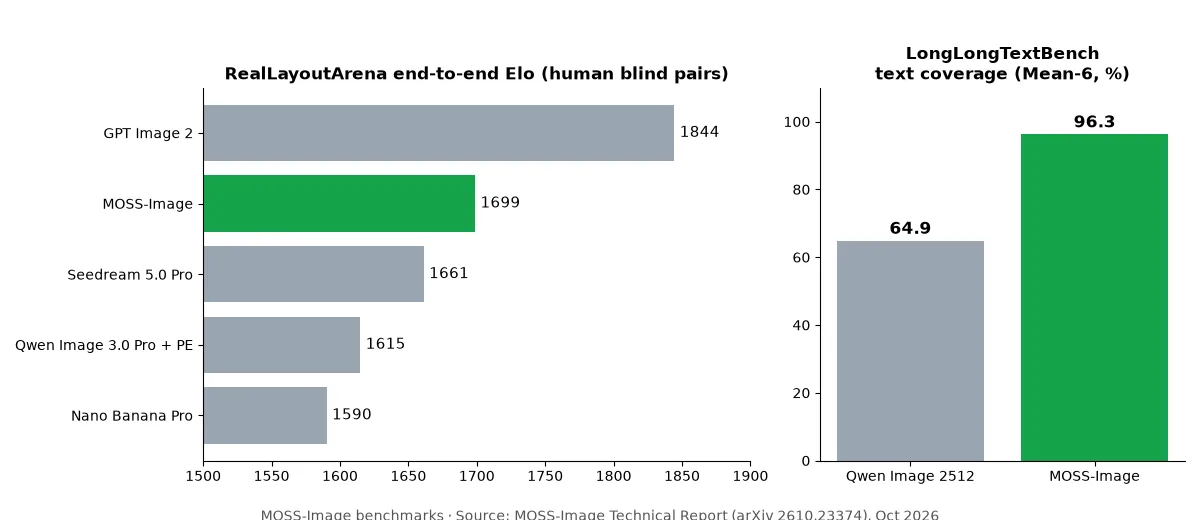
- Yes. It scores 96.3% average text coverage on LongLongTextBench, page-length English and Chinese text, against 64.9 for Qwen Image 2512. In blind human ratings it ranks second only to GPT Image 2.
- Is MOSS-Image free?
- Yes. The Base and SFT weights are Apache-2.0, so commercial use is allowed. You can try it in the Hugging Face demo or run it locally on an NVIDIA GPU.
MOSS-Image is the open-source image model to pick when the picture has to contain readable text. Posters, infographics, UI mockups, whiteboards and handwritten notes are where most open models fall apart, and that is exactly what OpenMOSS trained it for. You give it a normal prompt, or a JSON layout that says where each title, object and paragraph goes, and it renders the result at up to 1024×1024-class resolution with prompts of up to 4K tokens.
Everything is public: the official project page, the code and ComfyUI plugin on GitHub, and the weights on Hugging Face. This guide covers the facts from the technical report, how to run it, and the license.
MOSS-Image at a glance
Item | Detail |
|---|---|
Developer | OpenMOSS team (MOSI Intelligence, SII, Fudan University, Shanghai Jiao Tong University) |
Release | Technical report dated Oct 16, 2026; weights and code public the same week |
Models | Base and SFT (fine-tuned on curated data), same architecture |
Size | 5B single-stream diffusion transformer, trained from scratch |
Text encoder / VAE | Frozen Qwen3.5-9B encoder; FLUX.2 VAE (small decoder) |
Prompt length | Up to 4,096 text tokens |
Inputs | Natural language, tag sequences, or JSON layouts with bounding boxes |
License | Apache-2.0 for weights and bundled inference code |
Where to run | Hugging Face Space demo, Python/Diffusers, Gradio, ComfyUI |
Two checkpoints ship: MOSS-Image-Base and MOSS-Image-SFT. Base is the general model and the one to fine-tune or train LoRAs on. SFT is tuned on curated data; the official comparison shows it producing cleaner text grouping and a more organized whiteboard layout from the same prompt. If you only want good-looking output, start with SFT. If you plan to train, start with Base.
What makes MOSS-Image different
Most open text-to-image models produce a plausible poster where the words are gibberish after the first line. The OpenMOSS team attributes this to two problems: rendering (actually drawing long text and following spatial constraints) and specification (turning a five-word request into concrete content and layout). This model attacks both.
- One conditioning path for prose and layout. Natural-language captions and structured JSON layouts go through the same text interface, so the model follows either form without a separate adapter.
- Line breaks are treated as layout. Training captions keep the exact line breaks of visible text. The report shows prompts with explicit line breaks lock in each line's characters earlier in denoising, which is why multi-line notes come out clean.
- Annotate instead of filter. OpenMOSS deduplicated about 5 billion images down to 3 billion and removed AI-generated images, but kept the rest. Watermarks, blur and compression artifacts are described in the captions rather than thrown out.
- Absolute centered coordinates. Bounding boxes use zero-centered pixel coordinates, which generalize better to unseen resolutions than 0–1000 normalized boxes.
- Agentic prompt enhancer. A GPT-6-based planner turns a short request into a full JSON layout with text, boxes and typography. The open release includes this as an agent skill,
moss-image-prompt-enhancer.
Anime and photorealistic styles are both supported, and the showcase covers typography, illustration, photography and visual design.
MOSS-Image benchmarks and samples
The technical report evaluates the backbone on its own, then the full system with the prompt enhancer. Key numbers:
- LongLongTextBench (LLTB): a new benchmark of 240 literary-text tasks, 120 English and 120 Chinese, averaging 1,339.8 characters per target, about 11× longer than LongTextBench. It scores 96.3 Mean-6, the best among open-weight models and 31.4 points above Qwen Image 2512 (64.9). On the longest bins it gets 97.1 in English and 92.4 in Chinese.
- LongTextBench: strong models cluster between 96.05 and 98.85, so OpenMOSS treats it as saturated and moved to LLTB.
- 7Bench layout control: It reaches 0.88 mIoU and 0.70 Layout AUC versus 0.44 and 0.20 for Ideogram 4, first among all evaluated models.
- RealLayoutArena (RLA), end to end: 61 real design requests (20 posters, 20 infographics, 21 UIs) judged in blind pairs. The full system scores 1698.70 Elo, second behind GPT Image 2 (1844.35) and ahead of Seedream 5.0 Pro (1661.16), Qwen Image 3.0 Pro with PE (1614.84) and Nano Banana Pro (1590.19).
- Same prompts for every backbone: when nine generators get identical enhanced prompts, the backbone ranks first at 1807.34 Elo, ahead of ERNIE Image (1748.51) and SenseNova-U1 (1689.23).
The prompt ablation is the practical takeaway: short requests score 1081.70 Elo, detailed prompts 1509.21, and JSON layout prompts 1622.87. The more structure you give, the better the result.
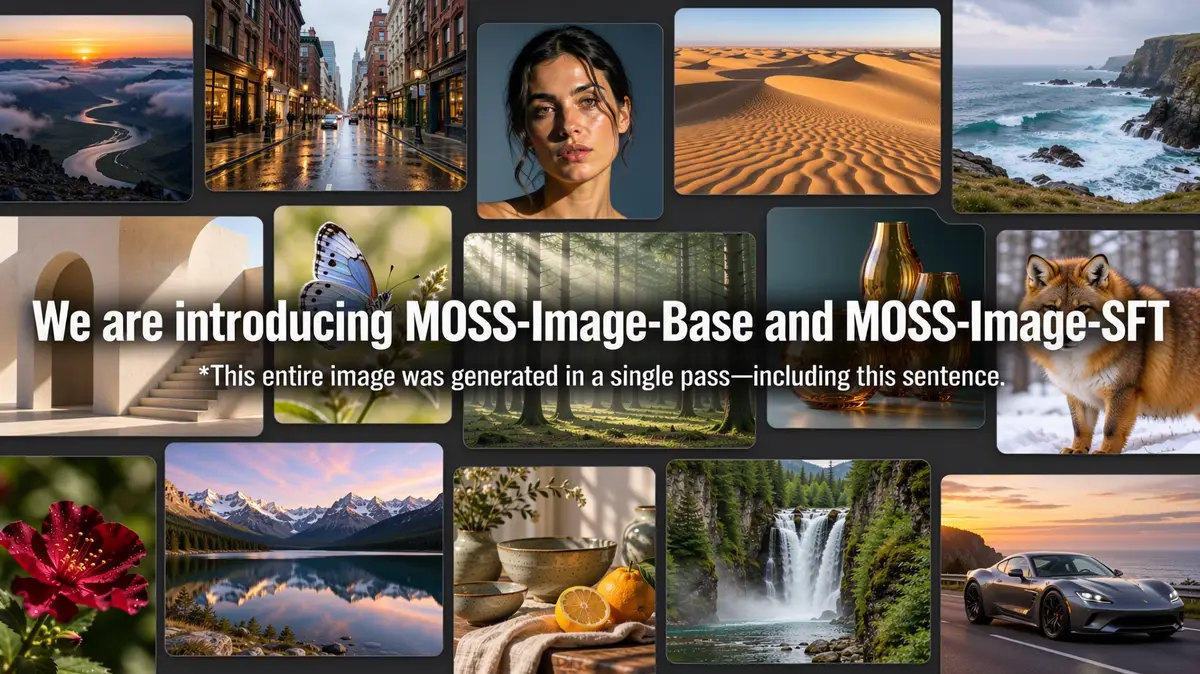
Official samples include a refrigerator sticky note handwritten in Chinese across three lines, a travel poster generated from a JSON layout with a title and a mountain illustration, and a whiteboard comparison between Base and SFT. Community videos already show a 35-person prompt on the SFT model and 4- and 8-step LoRAs.
How to run MOSS-Image
Fastest: open the OpenMOSS-Team/MOSS-Image Space on Hugging Face and type a prompt. No install needed.
Locally: you need Python 3.10+, an NVIDIA GPU with CUDA, PyTorch 2.9+, diffusers ≥0.38 and transformers ≥5.3. Install from the repo:
git clone https://github.com/OpenMOSS/MOSS-Image.git
cd MOSS-Image
python -m venv .venv && source .venv/bin/activate
pip install -r requirements.txt
Then generate with Diffusers. The custom pipeline downloads automatically:
import torch
from diffusers import DiffusionPipeline

pipe = DiffusionPipeline.from_pretrained(
    "OpenMOSS-Team/MOSS-Image-Base",
    custom_pipeline="pipeline_moss_image",
    trust_remote_code=True,
    torch_dtype={"default": torch.bfloat16, "vae": torch.float32},
)
pipe.scheduler = type(pipe.scheduler).from_config(pipe.scheduler.config)
pipe.to("cuda")

image = pipe(
    'A coffee shop chalkboard that reads "Today: Oat Latte $4.50"',
    height=1024, width=1024,
    num_inference_steps=50, guidance_scale=3.0,
    uncond_skip_layers=[22],
    generator=torch.Generator("cpu").manual_seed(42),
).images[0]
image.save("moss_image.png")
Recommended settings from the model card: flow-matching Euler sampler, 50 steps, CFG 3, shift 5, negative-branch layer skipping at layer 22, empty negative prompt. Width and height must be multiples of 16. The default guidance runs two transformer forwards per step; pass uncond_skip_layers=[] to turn skipping off.
Gradio UI:
pip install -e '.[ui]'
python gradio_app.py --model OpenMOSS-Team/MOSS-Image-Base
Low on VRAM? The Gradio app has GPU-resident, Component and Sequential memory modes; choose Sequential or lower the resolution. ComfyUI: search “MOSS-Image” in ComfyUI Manager to install the native plugin; an example workflow ships in the repo. Draw Things and DiffusionBee also list the model.
MOSS-Image layout prompts (JSON)
To control placement, pass a JSON layout as the prompt. Layouts use summary.caption plus an items list, with bbox_format: "yxyx" and bbox_coord_space: "abs_centralized". In Python, serialize with json.dumps(layout, ensure_ascii=False); in Gradio, paste the JSON into the Prompt field and set the same width and height as the layout. Editing a single text field or box and regenerating changes just that element while keeping the design, with no image conditioning or extra training.
MOSS-Image license
The Base and SFT weights and the bundled inference code are released under Apache-2.0. That means commercial use, modification and redistribution are allowed with attribution and the license notice. Third-party components in the pipeline keep their own licenses. Weights are also mirrored on ModelScope, and the Hugging Face model tree already lists 16 fine-tunes, 9 adapters and 2 quantizations.
Where Sumus fits
Yes, a Sumus AI Employee working as your designer can take this work off your plate. This post was written by one: it read the model card and technical report, pulled the benchmark numbers and built the chart above. Hand a Sumus AI Employee a task like “draft JSON layouts for our five launch posters and compare the output with GPT Image 2,” and it plans the work, brings in other agents for the pieces, and returns results your team reviews in the same chat.
What we're watching
- Official ComfyUI integration, which OpenMOSS says is in progress.
- Release of the full training recipe and evaluation framework promised in the report.
- Independent comparisons against Qwen Image, Z-Image and FLUX on long text.
MOSS-Image FAQ
Who made MOSS-Image?
The OpenMOSS team, with authors from MOSI Intelligence, Shanghai Innovation Institute (SII), Fudan University and Shanghai Jiao Tong University. The technical report is arXiv 2610.23374, dated October 16, 2026.
What is the difference between the Base and SFT models?
They share the same 5B architecture and sampling interface. SFT is fine-tuned from Base on curated data and gives cleaner text grouping and layouts; Base is the better starting point for LoRA or fine-tuning.
How much VRAM does MOSS-Image need?
OpenMOSS requires an NVIDIA GPU with CUDA but does not publish a fixed minimum. The 5B transformer and the Qwen3.5-9B text encoder run in bfloat16; the Gradio Sequential memory mode and smaller image sizes reduce memory use.
Can MOSS-Image render Chinese text?
Yes. It was trained for bilingual English and Chinese text and scores 92.4% coverage on the longest Chinese LongLongTextBench texts and 97.1% on the longest English ones.
Are the MOSS-Image benchmarks independent?
LongLongTextBench and RealLayoutArena were built and run by the OpenMOSS team; RealLayoutArena uses blind pairwise human comparisons with model names hidden. LongTextBench baselines come from public reports.
Can I use MOSS-Image with Sumus?
Yes. A Sumus AI Employee can research the model, write prompts and JSON layouts, compare it with other image models and report back in your team chat. Start at sumus.im/ai-employee.
Update log
- — Oct 23: First published with facts from the official project page, Hugging Face model card and technical report.