
Grok Bot Mac App: Download, Install and Setup (2026)
Grok Bot for Mac: the official macOS app for Apple silicon and Intel, how to install it in four steps, the plan you need, Mac shortcuts and fixes.
Quick answers (updated Oct 27, 2026)
- Is there a Grok Bot app for Mac?
- Yes. Grok Bot has an official macOS app. The main Download for macOS button on x.ai/bot gets the Apple silicon build; the Intel build is under More downloads.
- Which Mac version do I need?
- Open Apple menu > About This Mac. A Chip field (M1 to M5) means Apple silicon; a Processor field means Intel.
- Is Grok Bot for Mac free?
- The download is free. Using it needs Premium ($30/month), Super ($100), Ultra ($200), a paid Cursor plan, or a linked SuperGrok subscription.
Grok Bot Mac is the most common way people run SpaceXAI's AI teammates: the Mac build is the default download on the official page. Install takes about two minutes, and the Bots then work on their own cloud computer, so your Mac doesn't need to stay awake.
New to the product? Read What is Grok Bot?
Download Grok Bot for Mac
Mac | Download | Where |
|---|---|---|
Apple silicon (M-series) | Disk image (.dmg) | Download for macOS button on x.ai/bot |
Intel | Disk image (.dmg) | More downloads on x.ai/bot |
Download only from x.ai/bot. The file comes straight from Cursor's update server, because Grok Bot signs in with your Cursor account.
How to install Grok Bot on Mac
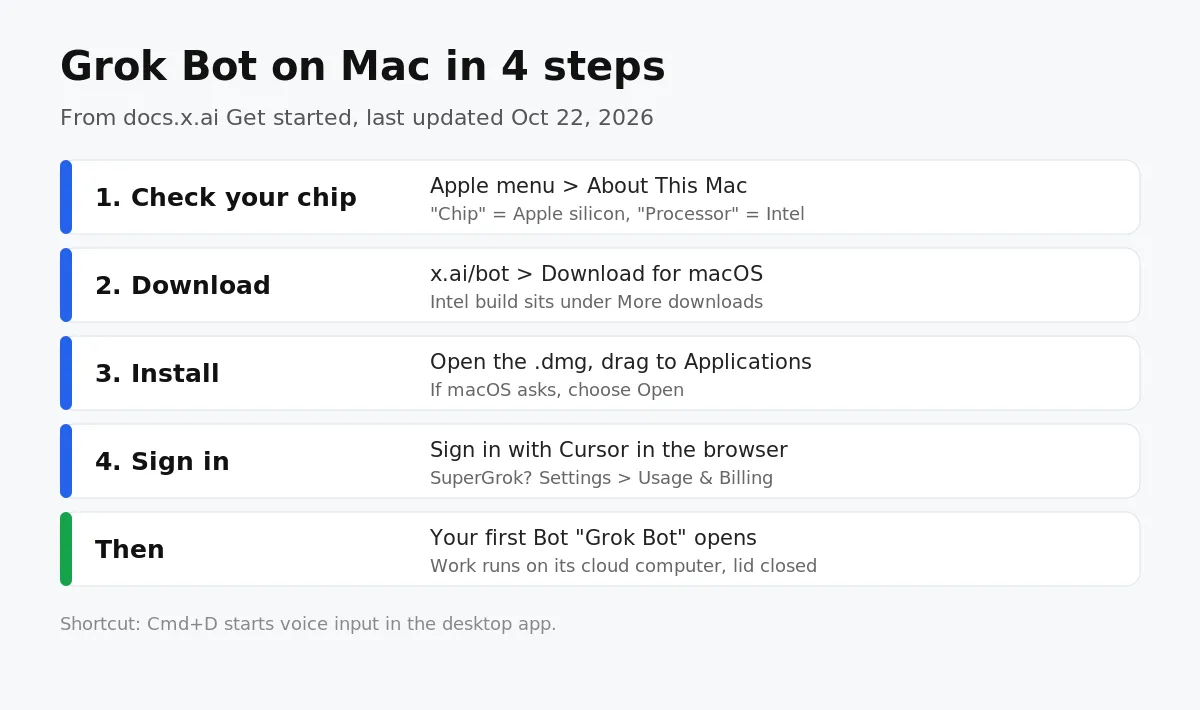
- Check your chip under Apple menu > About This Mac.
- Download the matching disk image and open it.
- Drag Grok Bot to Applications.
- Open Grok Bot. If macOS asks for confirmation, choose Open.
First-time setup on macOS
- Sign in. Choose Sign in and finish Cursor authentication in the browser. Organizations can use SSO.
- Link SuperGrok if that's your plan. Settings > Usage & Billing > Get Access with Grok.
- Meet your first Bot. Computer setup runs in the background and a Bot named Grok Bot opens a chat.
- Give it one job. For example: summarize an attached document and list every date, decision and open question.
- Sign in to your tools. When the Bot hits a login, choose Take over, type the password or 2FA code yourself, then I'm done.
Per the Get started guide, the Bot never sees your password, and the signed-in session is shared with your other Bots.
Grok Bot Mac tips
- Press Cmd+D to dictate a message, or choose Start voice chat to talk live.
- Use the Mac app for teach-by-demonstration: let a Bot watch a workflow once and it saves a routine.
- Editing and testing routines needs desktop, so set them up on your Mac and monitor them from the iPhone app.
- While the Mac app is open, notifications from your Bots go to the desktop instead of your phone.
- Grok Bot checks for updates by itself; Settings > Updates has a manual check.
Grok Bot on Mac not working?
- App won't open or setup hangs: fully quit and reopen; the docs say this clears most problems.
- Blocked at start-up: your Cursor account may use Legacy Privacy Mode. Switch it in Cursor privacy settings.
- "No access": you have the app but no eligible plan, or SuperGrok isn't linked.
- Wrong build: reinstall the Apple silicon or Intel version that matches your Mac.
Grok Bot Mac app vs Sumus
Grok Bot | Sumus | |
|---|---|---|
On a Mac | Native macOS app | Any browser: Safari, Chrome, Arc |
Models | Grok models | Grok 4.7, Claude Opus 5.5, Sonnet 5.5, GPT-6, Gemini, DeepSeek and more |
Who's in the chat | You and your Bots | Your AI teammates and your colleagues together |
Price to start | $30/month (Premium) | Free plan with monthly credits |
Run Grok Bot templates in Sumus
If you want Grok-powered help on your Mac without installing another app or buying another subscription, open Sumus in Safari or Chrome. Sumus gives you AI teammates that run Grok 4.7: pick a ready-made template like a researcher, an outreach writer or a weekly-report Bot, give it the job in plain words, and it gets to work in the same chat as your team. Mix in Claude Opus 5.5 for careful writing or GPT-6 for analysis, and connect local agents like Claude Code or Codex when a task needs your own machine.
See how the two compare on our Grok Bot alternative page.
Grok Bot Mac FAQ
Does Grok Bot work on Intel Macs?
Yes. An Intel build is available under More downloads on x.ai/bot.
Is there a Grok Bot Mac App Store version?
No. The Mac app downloads from x.ai/bot; the App Store listing is for iPhone and iPad.
Do I need to keep my Mac on?
No. Bots run on a cloud computer, so tasks and routines continue with your Mac closed.
Is Grok Bot also on Windows and Linux?
Yes. Windows x64/Arm64 and Linux .deb, .rpm and AppImage builds are on x.ai/bot.
Can I run Grok Bots in Safari on my Mac?
Yes. In Sumus, Grok 4.7 teammates and Bot templates run in Safari or Chrome on a free plan.
Update log
- — Oct 27: First published. Based on x.ai/bot and docs.x.ai Get started and Grok Bot for Mobile (updated Oct 22).