
Grok Bot App: iPhone, Android, Mac and Windows (2026)
Grok Bot app guide: the official iPhone, iPad and Android apps, Mac, Windows and Linux desktop builds, what each can do, the plan you need and setup steps.
Quick answers (updated Oct 27, 2026)
- Is there a Grok Bot app?
- Yes. SpaceXAI ships Grok Bot as an app: iPhone and iPad on the App Store, Android on Google Play, and desktop apps for Mac, Windows and Linux from x.ai/bot.
- Is the Grok Bot app free?
- The app is free to download, but using Bots needs an eligible plan: Premium $30/month, Super $100, Ultra $200, a paid Cursor plan, or a linked SuperGrok subscription.
- Is the Grok Bot app the same as the Grok app?
- No. Grok is the chat assistant. Grok Bot is a separate app for AI teammates that work on their own cloud computer and sign in to your tools.
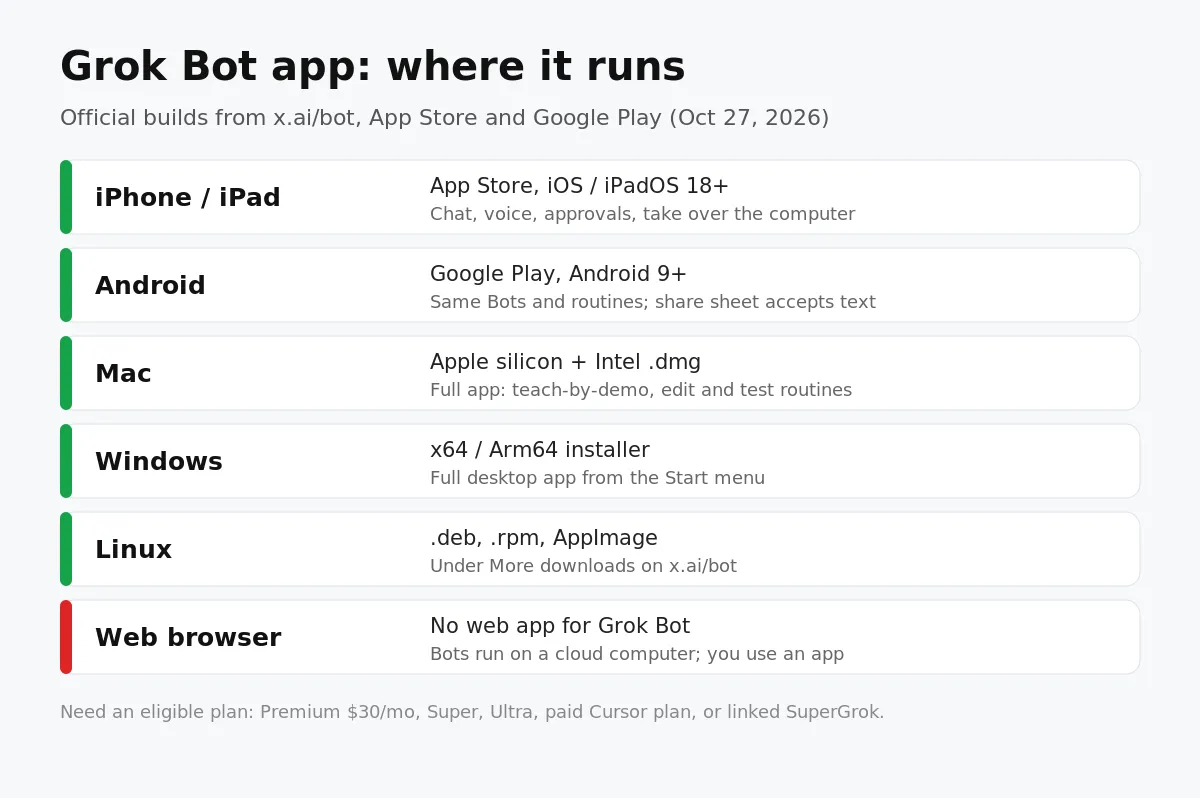
Grok Bot app searches keep climbing as SpaceXAI ships weekly updates to its AI teammates. There is one official app family, it works on every major device, and every copy connects to the same Bots. Here is which one to get and what each can do.
If you are new to the product, start with What is Grok Bot?
Official Grok Bot apps by device
Device | Where to get it | Requirement |
|---|---|---|
iPhone and iPad | App Store | iOS or iPadOS 18 or later |
Android | Google Play (ai.x.grok.bot) | Android 9 or later |
Mac | x.ai/bot, Download for macOS | Apple silicon or Intel build |
Windows | x.ai/bot, More downloads | x64 or Arm64 |
Linux | x.ai/bot, More downloads | .deb, .rpm or AppImage |
Get every build from x.ai/bot or the official store listings. Skip "Grok Bot APK" mirror sites: the real app signs in through your Cursor account and updates itself, so a repackaged file only adds risk.
What the Grok Bot mobile app can do
Per the Grok Bot mobile docs, the phone app connects to the same Bots, conversations, routines, connectors and shared cloud computer as desktop. Work keeps running in the cloud when the app is closed.
- Send text, dictate, or start a live voice chat with a Bot
- Attach photos and files, or share them in from the iPhone share sheet
- Create Bots and group chats, mention another Bot or @everyone
- Open the cloud computer to watch work or take over for a password or 2FA code
- Approve email or Slack drafts with Send or Discard
- Pause, resume or delete routines and read their run history
On October 19 the @bot account showed the iPhone Action Button shortcut (iPhone 15 Pro or later), and on October 22 Bots gained access to Calendar, Reminders, Contacts and other phone apps on iOS and Android.
Mobile vs desktop: what's different
Editing a routine's schedule or instruction, testing routines and teach-by-demonstration need the desktop app. Use the phone to start work, answer questions and approve steps; use Mac or Windows to build workflows.
How to set up the Grok Bot app
- Install the app for your device from the table above.
- Choose Log In or Sign Up and finish Cursor authentication in the browser.
- If your access comes from SuperGrok, choose Link Grok Account, then Finished Linking? Refresh My Status.
- Wait while the shared computer is set up; your first Bot, named Grok Bot, opens a chat.
- Give it one job, like "summarize this document and list every date and decision".
Grok Bot app pricing
Plan | Price | Usage |
|---|---|---|
Premium | $30/month | Weekly Grok Bot usage included |
Super | $100/month | 3.5x Premium usage, priority at peak |
Ultra | $200/month | 12x Premium usage, earliest access |
Teams and Enterprise plans include Grok Bot too. Extra usage beyond the weekly allowance is billed by token cost.
Grok Bot app vs Sumus in the browser
Grok Bot | Sumus | |
|---|---|---|
Install | Phone + desktop apps | Nothing; runs in the browser |
Models | Grok models | Grok 4.7, Claude Opus 5.5, Sonnet 5.5, GPT-6, Gemini, DeepSeek and more |
Who's in the chat | You and your Bots | Your AI teammates and your colleagues together |
Price to start | $30/month (Premium) | Free plan with monthly credits |
Run Grok Bot templates in Sumus
Plenty of people searching for the Grok Bot app just want Grok-powered teammates without another app and another subscription. Sumus gives you AI teammates that run Grok 4.7: pick a ready-made template like a researcher, an outreach writer or a weekly-report Bot, give it the job in plain words, and it gets to work in the same chat as your team. Mix in Claude Opus 5.5 for careful writing or GPT-6 for analysis, and connect local agents like Claude Code or Codex when a task needs your own machine.
See how the two compare on our Grok Bot alternative page.
Grok Bot app FAQ
Is there a Grok Bot app for iPhone?
Yes. It is on the App Store for iPhone and iPad running iOS or iPadOS 18 or later.
Is there a Grok Bot app for Android?
Yes. Install it from Google Play on Android 9 or later.
Does Grok Bot have a web app?
No. You use Grok Bot through its phone and desktop apps; the Bots themselves run on a cloud computer.
Do Bots keep working when I close the app?
Yes. Tasks and routines run on the shared cloud computer, so closing the app or your laptop doesn't stop them.
Why does the app say I have no access?
You need an eligible plan. If you pay for SuperGrok, link your Grok account in the app and refresh your status.
Can I run Grok Bot templates in the browser?
Yes. In Sumus, Grok 4.7 teammates and ready-made Bot templates run in your browser on a free plan.
Update log
- — Oct 27: First published. Based on x.ai/bot, docs.x.ai Grok Bot for Mobile and Get started (both updated Oct 22), and @bot posts from Oct 19 and Oct 22.