
Vercel agent-desktop: Computer Use for AI Agents, Install & How It Works
agent-desktop is Vercel Labs' open-source tool that lets AI agents use desktop apps via the accessibility tree. Install, how it works, token savings and limits.
Quick answers
- What is Vercel agent-desktop?
- An open-source CLI from Vercel Labs that gives AI agents computer use on macOS, Windows and Linux. It reads apps through the OS accessibility tree instead of screenshots.
- How do I install agent-desktop?
- Run npm install -g agent-desktop, then agent-desktop version. It ships native binaries for x64 and ARM64.
- Is agent-desktop free?
- Yes. It is open source under the Apache-2.0 license.
- Does it take over my mouse?
- No, not by default. Actions go through the accessibility API without moving the pointer or taking focus. A --headed flag allows real mouse and keyboard input.
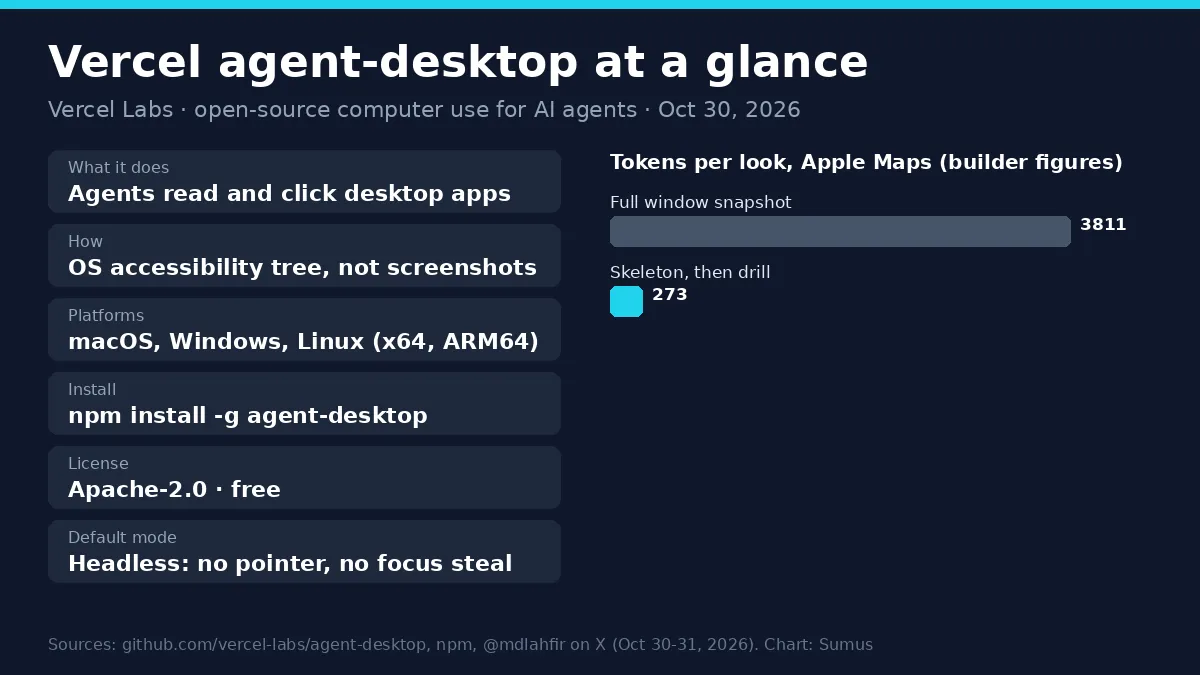
Your AI agent can now use any desktop app, not just the browser. That's the pitch of agent-desktop, a new open-source tool from Vercel Labs.
It was announced on X on October 30, 2026. Builder Lahfir called it "Computer use for your agents", and Vercel CEO Guillermo Rauch shared it as "An agent on every desktop". The GitHub repo passed 1,900 stars within two days. Here's what it does, how to set it up, and where it fits.
1. agent-desktop at a glance
Item | Detail |
|---|---|
Maker | Vercel Labs |
What it does | Computer use for AI agents on the desktop |
How it sees apps | OS accessibility tree (no pixel matching) |
Platforms | macOS, Windows, Linux; x64 and ARM64 |
Install | npm install -g agent-desktop |
Built in | Rust; CLI plus a C library (FFI) |
License | Apache-2.0 |
Latest version | 1.0.2 (npm, Oct 30, 2026) |
Commands | 60 names, 56 working commands |
2. How agent-desktop works
The loop is simple: look, act, look again. The agent asks for a snapshot of an app. agent-desktop returns JSON with a ref for every element the agent can click or type into. The agent acts on a ref, then takes a new snapshot to check it worked.
- Refs, not pixels. The agent clicks a named button, not a guessed spot on the screen.
- Refs belong to one snapshot. If the screen changes, the tool returns STALE_REF or AMBIGUOUS_TARGET, and the agent snapshots again.
- Safe retries. Every error says whether a retry is safe, so agents don't double-click a "Send" button.
- Headless by default. The agent can work while you keep using the same computer.
3. The token savings
Big apps have huge accessibility trees. agent-desktop lets the agent map a window first with a skeleton snapshot, then drill into one region. The builder's numbers for Apple Maps:
Measure | Full window | Skeleton, then drill |
|---|---|---|
Tokens per look | 3,811 | 273 |
Simulated 52-step task | 198k tokens | 31k tokens |
These are the builder's own figures from one test, not an independent benchmark. Results will depend on how well each app exposes its interface.
4. How to install and use agent-desktop
- Install: `npm install -g agent-desktop` (Bun, Yarn and pnpm work too).
- macOS: grant Accessibility permission with `agent-desktop permissions --guide`.
- Linux: run inside your graphical session with at-spi2-core.
- Windows: no extra grant for apps at your terminal's level.
- Try it: `agent-desktop snapshot --app Finder -i`, then `agent-desktop click @<snapshot>:e8`, then snapshot again.
- Teach your agent: `npx skills add https://github.com/vercel-labs/agent-desktop --skill agent-desktop`, or tell it to run `agent-desktop skills get desktop` first.
5. agent-desktop vs agent-browser vs screenshot agents
agent-desktop | agent-browser | Screenshot computer use | |
|---|---|---|---|
Works in | Any desktop app | Web browser | Any app |
Sees | Accessibility tree | Page structure | Pixels |
Moves your mouse | No (default) | No | Usually yes |
Token cost | Low with drilling | Low | High (images) |
Weak spot | Apps with poor accessibility | Web only | Slower, guesses positions |
6. Watch out for privacy
The README is clear: snapshots, clipboard reads, screenshots and logs "can contain private desktop content." An agent that can read every app can read whatever is on screen. Keep its output out of public logs, and give agents a machine or account scoped to the job.
7. Want AI agents that already have their own computer?
Yes, you can skip the setup. In Sumus, AI employees work in your team group chat, each with its own cloud workspace. Hand one a task with an @mention, it does the work, and your whole team sees the result in the thread. No CLI, no permissions dance, and nothing runs on your laptop.
What we're watching
- Official Homebrew and Scoop packages (being submitted).
- Independent computer-use benchmarks for accessibility-tree tools.
- Which agent harnesses ship agent-desktop support by default.
FAQ
Who made agent-desktop?
Vercel Labs. Lahfir, who works on it at Vercel Labs, announced it on X on October 30, 2026.
Does agent-desktop use screenshots?
Not for normal work. It reads the accessibility tree and returns JSON refs. It does have a screenshot command if you need one.
Is agent-desktop the same as agent-browser?
No. agent-browser drives web pages. agent-desktop drives desktop apps across the whole operating system.
Does agent-desktop work on Linux Wayland?
Partly. The accessibility tree works through AT-SPI; some window and mouse features need X11, and screenshots use the Wayland portal.
Is there an easier way to give AI agents a computer?
Yes. Sumus AI employees each work on their own cloud computer inside your team chat, so there is nothing to install.
Sources
- vercel-labs/agent-desktop README on GitHub, read Nov 1, 2026.
- npm package agent-desktop, version 1.0.2, Oct 30, 2026.
- @mdlahfir, @ctatedev and @rauchg on X, Oct 30-31, 2026.
Update log
- — Nov 1: First published. agent-desktop 1.0.2 announced Oct 30, 2026.