
GitHub Copilot Fusion: What It Is, How Routing Works & Cost
GitHub Copilot Fusion (GA Oct 28, 2026) picks models for you via Single, Cascade or Critique. No extra fee, 30% off to Nov 30. How it routes and what it costs.
Quick answers
- What is GitHub Copilot Fusion?
- A model router and orchestrator in GitHub Copilot, generally available since GitHub Universe on Oct 28, 2026. You pick an effort level; Fusion picks the models and how to combine them.
- How does Copilot Fusion route?
- For each prompt it chooses one of three patterns: Single (one model), Cascade (a cheap draft checked by a judge that can escalate) or Critique (parallel reviewers, then a revision).
- How much does Copilot Fusion cost?
- No separate fee. You pay each model it uses at that model's normal rate. Paid plans get 30% off Fusion model costs through Nov 30, 2026.
- Who can use Copilot Fusion?
- All Copilot plans, in VS Code, Copilot CLI, the GitHub Copilot app and JetBrains IDEs. It replaces the old Auto model option.
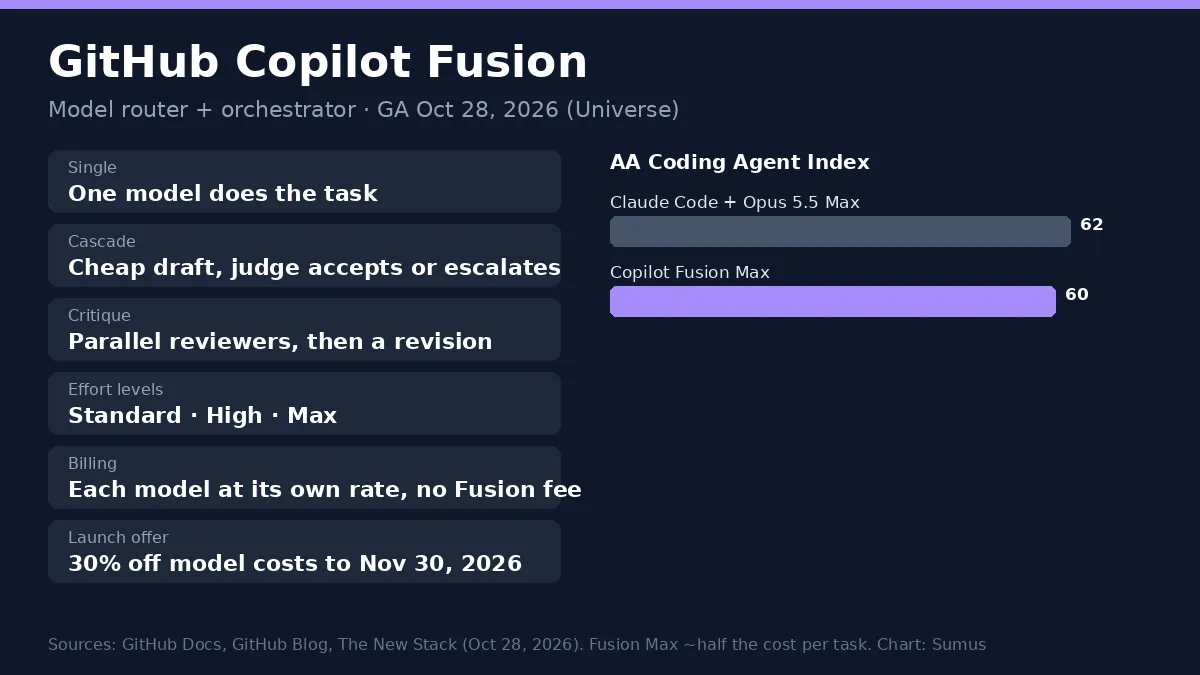
GitHub launched GitHub Copilot Fusion at GitHub Universe on October 28, 2026. Copilot Fusion picks the models for you: you choose Standard, High or Max effort, and it decides whether one model is enough or several should work together. On the Artificial Analysis Coding Agent Index, Fusion Max scored 60, within two points of Claude Code with Opus 5.5 Max, at about half the cost per task.
Fusion grew out of Project HydraFusion, a research preview from September 2026. It now replaces the Auto option in the model picker and is rolling out to every Copilot user.
1. GitHub Copilot Fusion at a glance
Item | Detail |
|---|---|
What it is | Runtime model router and orchestrator for Copilot |
Launched | Oct 28, 2026, GitHub Universe (GA) |
Effort levels | Standard, High, Max (Fast only in VS Code inline chat) |
Execution patterns | Single, Cascade, Critique |
Where | VS Code, Copilot CLI, Copilot app, JetBrains IDEs |
Plans | All GitHub Copilot plans |
Billing | Each model at its standard rate, no Fusion fee |
Launch discount | 30% off model costs through Nov 30, 2026 |
Replaces | The Auto model option |
2. How Copilot Fusion routing works
According to GitHub's docs, Fusion scores each task on capability signals for reasoning, code generation, debugging and tool use. Then it chooses the cheapest execution pattern that clears the quality bar for your effort level:
Pattern | What happens | When it fits |
|---|---|---|
Single | One model completes the task | Everyday edits and questions |
Cascade | An efficient model drafts; a judge accepts it or escalates to a stronger model | Work that is usually easy but sometimes hard |
Critique | One model drafts, several models critique in parallel, the drafter revises | Hard bugs and multi-file changes |
The choice happens per prompt, so one session can mix patterns. Fusion also checks real-time model health, and it switches models only at natural cache boundaries so you don't lose cached tokens. You can watch each step and its model while it runs, then hover the effort label to see every model used. Intermediate drafts are hidden; you see one final answer.
Two limits to know: Fusion has no context window of its own (each step uses the running model's limit, and the displayed figure is the smallest in the pool), and if a discarded draft already edited files, those edits are not rolled back. Review before you commit.
3. Copilot Fusion effort levels
Level | Priority | Typical use |
|---|---|---|
Fusion Standard | Balances cost, quality, latency; one model per task | Everyday work |
Fusion High | Balanced orchestration, moderate token savings | Complex bugs, multi-file changes |
Fusion Max | Frontier capability, still token-aware | Deepest reasoning and analysis |
Fusion Fast | Fast models only | VS Code inline chat (not selectable) |
On Fusion Standard, Copilot can also route to local models: MAI Code 1.1 Flash on Windows, or Qwen3.8 Flash Next via Ollama in Copilot CLI. This is in public preview behind experimental settings.
4. Copilot Fusion cost
There is no Copilot Fusion surcharge. You are billed for each model Fusion calls, at its standard per-model rate. Standard usually costs the same as asking one model. High and Max can call several models, so a task may use more AI credits than Standard. Through November 30, 2026, paid plans get 30% off model costs under Fusion.
GitHub's headline is efficiency: Fusion Max used about half the tokens and about 40% less time per task than Claude Code with Opus 5.5 Max on the AA Coding Agent Index, at roughly half the API cost. Admins can still exclude models by policy, and Fusion never uses models outside your plan.
5. Copilot Fusion vs picking models yourself
Picking models by hand gives control but costs attention; an AT&T engineer told GitHub developers often left a premium model on for simple tasks. Fusion removes that choice. If you need one exact model for a step, GitHub suggests a custom agent pinned to that model instead.
How to use Copilot Fusion
- Update VS Code to 1.144 or later (or use Copilot CLI, the Copilot app or a JetBrains IDE).
- Open the model picker in Copilot Chat and choose Copilot Fusion.
- Pick an effort level: Standard, High or Max. High and Max need Copilot Pro+, Max, Business or Enterprise.
- Optional: turn on local models with `chat.copilot.localModel.enabled` (experimental, Fusion Standard only).
- Admins: model policies still apply; Fusion only uses models your plan allows.
6. Where Sumus fits
Yes, you can get the same multi-model idea for work beyond code. In Sumus each model, Claude, GPT, Gemini and more, works as an AI employee in your team chat. One drafts, another reviews, and your team sees both answers in the same thread, for research, writing and ops as well as coding.
What we're watching
- Which models join the Fusion pool after launch.
- Real per-task bills once the 30% discount ends on Nov 30, 2026.
- Independent tests of Cascade and Critique against single-model runs.
FAQ
Is GitHub Copilot Fusion free?
It is on every Copilot plan, including Free, but usage is billed per model at standard rates; there is no extra Fusion charge.
Does Copilot Fusion replace Auto?
Yes. GitHub says Fusion replaces the Auto model option and is rolling out to all Copilot users.
What models does Copilot Fusion use?
A changing pool of versatile and strong-reasoning models allowed by your plan and admin policy, plus optional local models on Standard.
Is Copilot Fusion the same as subagents?
No. Fusion works separately from subagents and does not start them.
What was Project HydraFusion?
The September 2026 research preview that became Copilot Fusion.
How do I turn on Copilot Fusion in VS Code?
Update to VS Code 1.144+, open the Copilot Chat model picker and select Copilot Fusion, then choose Standard, High or Max effort.
Which plans get Fusion High and Max?
Copilot Pro+, Max, Business and Enterprise. Other plans get Fusion Standard.
Sources
- GitHub Docs: About GitHub Copilot Fusion. Read Oct 29, 2026
- GitHub Blog: GitHub Universe 2026, Oct 28, 2026
- GitHub Changelog (JetBrains Universe releases) and The New Stack, Oct 28, 2026.
Update log
- — Nov 1: Added step-by-step "how to use Copilot Fusion" and plan rules for effort levels; 2 FAQs.
- — Oct 29: First published. Copilot Fusion GA Oct 28, 2026; routing, effort levels and billing from GitHub Docs.