
ChatGPT GIF: How to Make GIFs in ChatGPT (Images 2.6)
ChatGPT GIF making is built in with Images 2.6: turn a prompt or photo into a looping GIF, change speed, edit frames. Steps, prompts that work and limits.
Quick answers
- Can I make GIFs outside ChatGPT?
- Yes. Make GIFs with GPT Image 2.6 in Sumus — just ask your AI teammate for a GIF in the chat.
- Can ChatGPT make a GIF?
- Yes. Since Nov 4, 2026, ChatGPT GIF making is built in with Images 2.6. Type a prompt or upload a photo and ChatGPT returns an animated GIF.
- Is ChatGPT GIF making free?
- Yes. Images 2.6 is on every ChatGPT plan, Free included, on web, desktop and mobile, with plan limits.
- Can I edit a ChatGPT GIF?
- Yes. You can change the playback speed, view it frame by frame, edit single frames and share it.
- What model makes a ChatGPT GIF?
- GPT Image 2.6 (Flare and Sunburst), OpenAI's image model released with Images 2.6.
Make GIFs with GPT Image 2.6 in Sumus — just ask your AI teammate for a GIF, no ChatGPT plan limits to wait on. ChatGPT GIF making is finally built in. With the Images 2.6 update on November 4, 2026, you can type a prompt or upload a photo and get an animated ChatGPT GIF back in one step. Then you can change its speed, edit single frames and share it on repeat.
Sumus also puts GPT, Claude, Gemini and Grok in one chat, so one model can write the GIF prompt and another can check it.
Before this, a ChatGPT GIF meant a workaround: make several images, then ask ChatGPT to stitch them together with code. This guide shows the new way, with prompts that work, tips, limits and what to do next.
ChatGPT GIF: what's new
Feature | What it does |
|---|---|
Prompt to GIF | Describe the motion, get a looping GIF |
Photo to GIF | Upload a photo or sketch and animate it |
Speed | Make the loop faster or slower |
Frames | See and edit single frames |
Reference images | Save yourself, pets or characters to reuse |
Plans | All ChatGPT plans, web, desktop, mobile, plus Codex |
Model | GPT Image 2.6 |
How to make a ChatGPT GIF
- Open ChatGPT on web, desktop or mobile. Images 2.6 is rolling out to all plans.
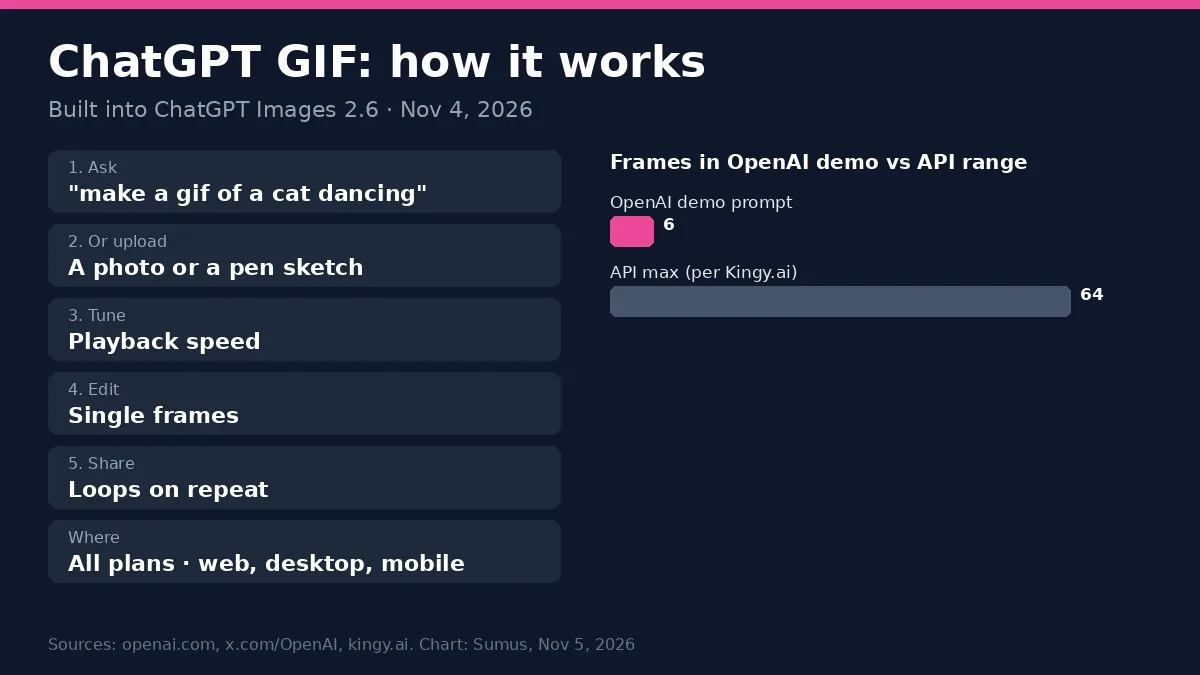
- Type what should move, for example "make a gif of a cat dancing". Or upload a photo and say how it should move.
- Wait for the frames. ChatGPT draws a short set of frames with the same character and plays them as a loop.
- Change the playback speed or open it frame by frame.
- Edit any single frame with a follow-up message, then download or share your ChatGPT GIF.
ChatGPT GIF prompts that work
OpenAI's own examples are detailed. Their prompts ask for "a single animation sprite sheet for a seamless looping GIF", exactly 6 frames in a 3-by-2 grid, a fixed camera, the same character and background in every frame, and a last frame that leads back into the first. Copy that shape:
- Say the motion step by step: "notices the chart falling, eyes widen, then wipes tears".
- Lock what stays the same: same character, same outfit, same room, fixed camera.
- Ask for a loop: "the last frame flows back to the first".
- Ban clutter: "no captions, no words, no borders" if you want a clean ChatGPT GIF.
- Start small: 4 to 6 frames is enough for a reaction or a mascot.
ChatGPT GIF ideas
- A reaction GIF or meme for your group chat.
- Your brand mascot waving for a campaign.
- A product shot that spins or sparkles.
- A pen sketch that comes to life, like OpenAI's owl demo.
- An animated storyboard to test a move before you make a video.
ChatGPT GIF limits
- It is a short loop, not a video. For longer clips you still need a video tool.
- Stricter rules: the system card says some content is blocked more for GIFs than for still images, because motion can add meaning.
- Free plans have tighter image limits than paid plans.
- Faces and small text can drift between frames. If they do, ask for fewer frames or a simpler scene.
ChatGPT GIF in the API
Developers get GIF output with the new GPT-Image-2.6 Flare and Sunburst models. Flare is the fast one, as quick as six seconds per image. Sunburst keeps characters steadier across edits. Kingy.ai, reading the API docs, reports 2 to 64 frames per GIF. Full details are in our GPT Image 2.6 guide.
Make a ChatGPT GIF, then let other AI models check it
Yes, you can get a second opinion on your ChatGPT GIF idea from other AI models in the same place. In Sumus, AI teammates on GPT, Claude, Gemini and Grok share one chat: one writes the frame-by-frame prompt, one makes the images, and another checks that the character stays the same. Your friends or team see it all in one thread.
FAQ
How do I make a GIF in ChatGPT?
Ask "make a gif of ..." or upload a photo and ask ChatGPT to animate it. Images 2.6 does it in one step.
Why can't I make a ChatGPT GIF yet?
Images 2.6 is rolling out. Update the app or refresh the web page and try again later.
Can ChatGPT turn a video into a GIF?
The new feature starts from a prompt or a photo. For video files, the old way still works: upload the clip and ask ChatGPT to convert it with code.
Can I use a ChatGPT GIF at work?
Yes. OpenAI pitches GIFs for mascots, campaigns, social posts and storyboards.
Does Codex make GIFs too?
Yes. Images 2.6 is in Codex as well as ChatGPT.
Update log
- — Nov 5: Added how to make GIFs with GPT Image 2.6 in Sumus.
- — Nov 5: First published after OpenAI launched GIFs in ChatGPT Images 2.6.