
Seedream 5.5: Features, Price, Benchmarks & How to Use It
Seedream 5.5 is out (Nov 9, 2026). ByteDance's new image model: 100-round editing, native transparent images, clearer text, from $0.02/image. Full guide.
Quick answers
- Is Seedream 5.5 out?
- Yes. ByteDance's Seed team released Seedream 5.5 on November 9, 2026. It is rolling out in ByteDance apps, Volcano Engine Ark in China and BytePlus worldwide.
- What is new in Seedream 5.5?
- Three things: stable editing across up to 100 rounds, native transparent (RGBA) images, and more real-looking photos with clearer small text.
- How much does Seedream 5.5 cost?
- BytePlus lists Seedream 5.5 from $0.02 per image. In China, a 2K square edit is reported at about 0.28 yuan.
- Can I make images in Sumus now?
- Yes. GPT Image 2.6 runs in Sumus today, so your AI employee can make and edit images right in your team chat.
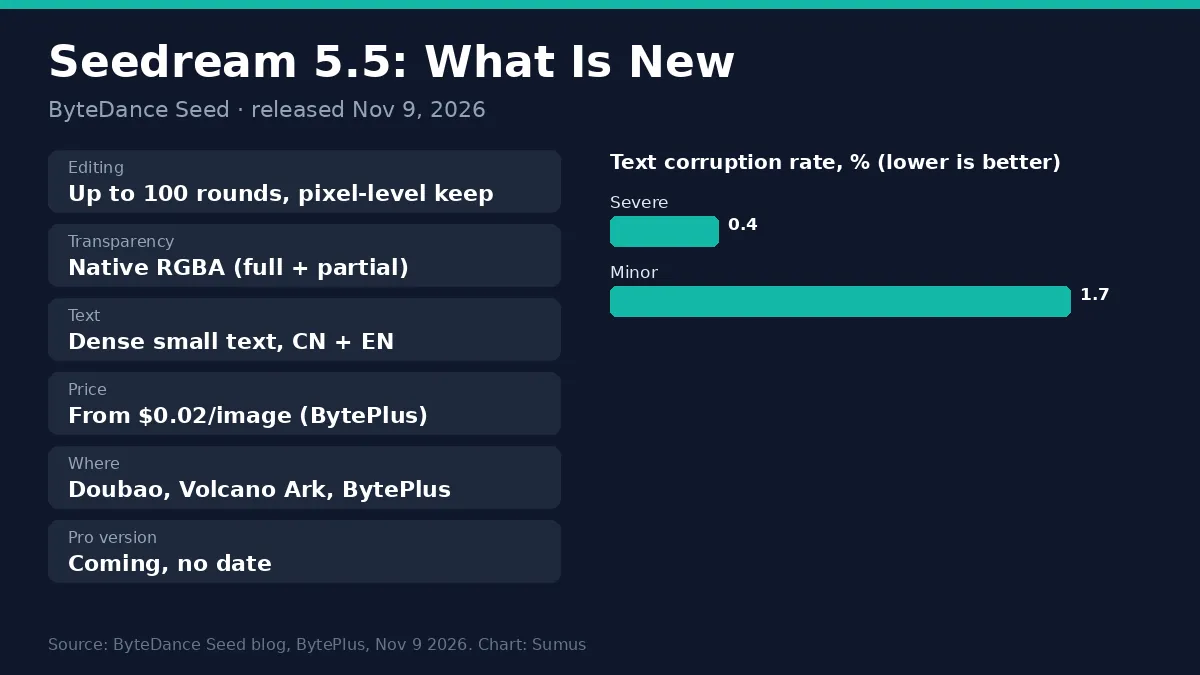
Seedream 5.5 is out. On November 9, 2026, ByteDance's Seed team introduced Seedream 5.5, its next image model. The big claim is editing: you can change one image again and again, up to 100 rounds, and the parts you did not touch stay the same down to the pixel.
Here is what Seedream 5.5 does, the test numbers ByteDance shared, the price, where to use it, and how it stacks up against GPT Image.
What is Seedream 5.5?
Seedream 5.5 is ByteDance's image creation and editing model, the next step after Seedream 5.0 Pro (July 2026) and 5.0 Flash (October 2026). The official Seedream 5.5 page calls it "a multimodal image generation model with greater creativity and more precise execution." ByteDance says a Seedream 5.5 Pro version will follow, with no date yet.
Seedream 5.5 features
- Editing that does not drift: change clothes, props or furniture round after round; untouched areas keep their pixels and colors.
- Native transparent images: It outputs PNG-style images with an alpha channel, full or partial transparency, so stickers and cutouts need no background removal.
- More real photos: more natural light, skin and materials, with less plastic gloss and overexposure.
- Clearer small text: dense English and Chinese text, like a newspaper page or an infographic, stays readable.
Seedream 5.5 editing: 100 rounds on one image
Most image models redraw the whole picture on every edit, so faces soften and colors wander after a few rounds. In ByteDance's demo, the team made 100 edits in a row on one portrait, each built on the last output, and the model could still change a ring or a pair of glasses at the end. Other demos move a box around a room, and the model fixes the shadows and fills in what was hidden behind it.
These are ByteDance's own picked examples. The fair test is your own: run 20 or 30 edits on one of your images and check the parts you did not ask to change.
Seedream 5.5 benchmarks: what ByteDance measured
Test | Compared with | Seedream 5.5 result |
|---|---|---|
Usability, film/TV and office work | Seedream 5.0 Pro | More than 2x |
Realism, image-to-image (GSB) | Seedream 5.0 Pro | +55.62% |
Text structure | GPT Image 2.5 Sunburst, Nano Banana 2.1 | Leads (no number given) |
Severe text errors | Own test set | 0.4% |
Minor text errors | Own test set | 1.7% |
ByteDance tested six jobs on its MagicArena platform: e-commerce, marketing, film and TV, gaming, office work and fashion design. The new model beat 5.0 Pro in all six. Against rivals, ByteDance only says it leads on text structure and text-to-image realism, without head-to-head numbers. No outside leaderboard has scored it yet.
Seedream 5.5 price and API
The BytePlus Seedream page lists it starting at $0.02 per image, with starter packs of 700, 1,800 and 3,500 images. IT Home reports the China API at about 0.28 yuan for a 2K square edit, under half the cost of Seedream 5.0 Pro, and no charge for text tokens. The public API model ID was not yet listed on launch day.
Where to use Seedream 5.5
- Dreamina / CapCut and Doubao: ByteDance's own apps get it first.
- BytePlus ModelArk: the international API and playground.
- Volcano Engine Ark: the API inside China.
- Third-party sites: many image sites say it is coming soon; check that the model name is live before you pay.
Seedream 5.5 vs GPT Image 2.6
Seedream 5.5 | GPT Image 2.6 | |
|---|---|---|
Maker | ByteDance Seed | OpenAI |
Released | Nov 9, 2026 | Nov 2026 |
Best at | Many-round edits, transparent assets, small text | Fast drafts, animated GIFs, SVG export |
Transparent output | Native RGBA | Transparent background option |
Price signal | From $0.02/image | About $0.025 per 1024 image (low) |
In Sumus | Not yet | Yes, today |
Pick ByteDance's model if you edit one master image into many variants, like product colors or outfits. Pick GPT Image 2.6 if you want images inside the tools your team already works in, with no new account.
Make images in Sumus while Seedream 5.5 rolls out
You do not need a new API key to start. In Sumus, GPT Image 2.6 works inside your team chat: ask your AI employee for a product shot, a poster or a sticker, then edit it in plain words in the same thread. Your team sees every version and picks the best one.
Seedream 5.5: what we're watching
- The API model ID on BytePlus ModelArk.
- Seedream 5.5 Pro: date and specs.
- Outside scores on image arenas, and listings on fal and Replicate.
FAQ
Is Seedream 5.5 free?
You can try it in ByteDance apps such as Dreamina, with free daily credits there. The API is paid, from $0.02 per image on BytePlus.
Can Seedream 5.5 make transparent PNGs?
Yes. It makes images with an alpha channel directly, from a prompt or a reference image.
Is there a Seedream 5.5 Pro?
ByteDance says a Pro version will follow. No date yet.
Is Seedream 5.5 better than GPT Image?
ByteDance says it leads GPT Image 2.5 on text structure and realism, but gave no numbers. Test it on your own prompts.
Can I use Seedream 5.5 in Sumus?
Not yet. You can make and edit images in Sumus today with GPT Image 2.6.
Update log
- — Nov 9: First published on launch day. Features, ByteDance test numbers, BytePlus price, where to use it, vs GPT Image 2.6.