
MiniMax H3 Image: Open 4K Image Model, Price & How to Use
MiniMax H3 Image makes 4K images in under 10 seconds with open weights and up to 16 reference images. Specs, pricing, ComfyUI setup and how it compares with H3.
Quick answers
- What is MiniMax H3 Image?
- MiniMax H3 Image (H3-Image) is MiniMax's open-weight image generation and editing model, released November 10, 2026. It is built on the H3 video model and makes 4K images in under 10 seconds.
- Is MiniMax H3 Image free?
- The weights are free on Hugging Face and run in ComfyUI. Hosted use on the MiniMax API is paid; MiniMax says it costs 50–70% of comparable models, with 50% off 4K requests in launch week.
- How much does MiniMax H3 Image cost on OpenRouter?
- $2.30 per million text input tokens, $1.50 per million image input tokens and $3.80 per million image output tokens.
- Can MiniMax H3 Image edit photos?
- Yes. The same checkpoint does text-to-image and reference editing with up to 16 reference images.
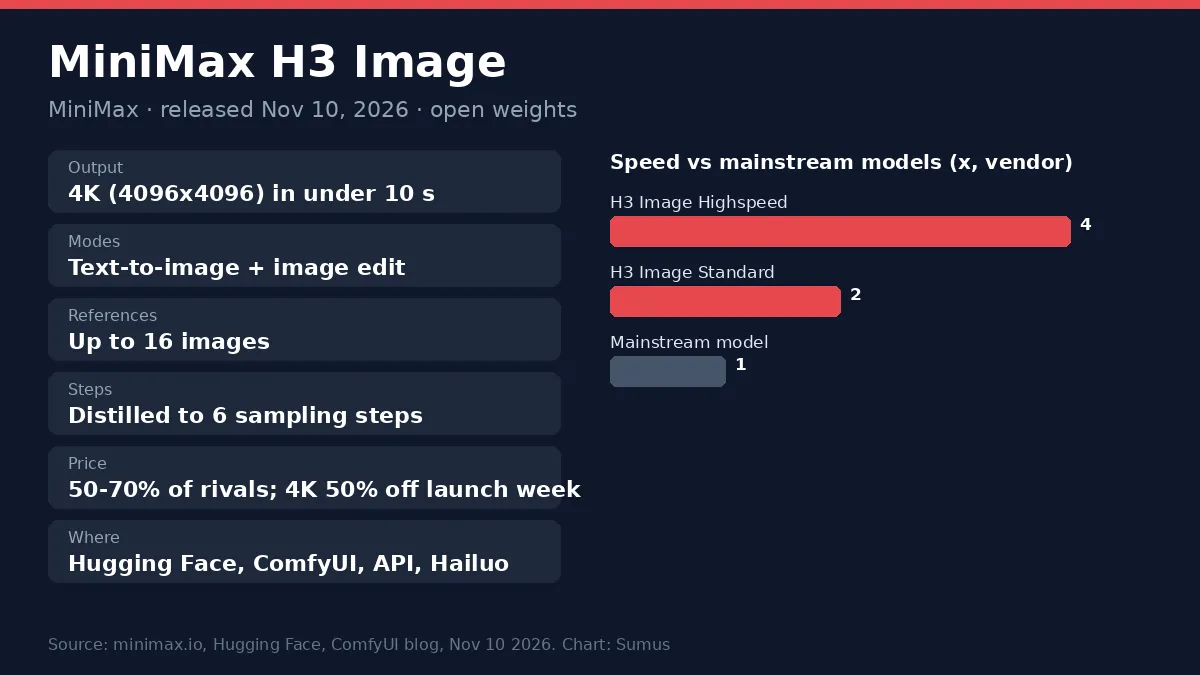
MiniMax H3 Image brings 4K AI images down to under 10 seconds, with open weights. MiniMax released MiniMax H3 Image on November 10, 2026. It turns the H3 video model into an image model that does text-to-image, reference-based generation and image editing in one checkpoint, at up to 4096 x 4096 pixels.
Below: what MiniMax H3 Image can do, its price, how to run MiniMax H3 Image in ComfyUI or through the API, and how it differs from the H3 video model and Pruna's P-H3 Image.
MiniMax H3 Image at a glance
Item | MiniMax H3 Image |
|---|---|
Maker | MiniMax |
Released | November 10, 2026 |
Weights | Open, on Hugging Face (MiniMaxAI/MiniMax-H3-Image) |
Output | About 16 MP at every aspect ratio, 4096x4096 up to 6272x2688 (21:9) |
Speed | 4K in under 10 s; Standard 1.5–2x, Highspeed 3–4x mainstream |
Steps | Distilled to 6 sampling steps, no classifier-free guidance |
References | Up to 16 images per request |
Text encoder | Same Qwen3-VL encoder as MiniMax H3 |
Where | Hugging Face, ComfyUI, MiniMax API, MiniMax Code, Hailuo AI, OpenRouter |
What MiniMax H3 Image does well
- Speed at 4K: a full 4096 x 4096 image in under 10 seconds, which MiniMax says is up to 5x faster than mainstream rivals.
- Real-looking detail: MiniMax says it avoids the over-smooth "AI look" on skin, fabric and texture.
- Prompt following: MiniMax claims state-of-the-art prompt adherence among open-weight image models.
- One model for make and edit: connect reference images and it edits; leave them out and it generates from text.
- Wide shapes: native 16 MP at 1:1 up to 21:9, with no separate upscaler.
MiniMax H3 Image pricing
On the MiniMax API Platform, MiniMax prices H3-Image at 50–70% of comparable mainstream offerings, and gives 50% off 4K-and-above requests during launch week. OpenRouter lists it at $2.30 per million text input tokens, $1.50 per million image input tokens and $3.80 per million image output tokens, up to 10 images per request in JPEG, PNG or WebP. Running the open weights on your own GPU costs only your hardware time.
How to use MiniMax H3 Image in ComfyUI
- Update ComfyUI to the latest version, or open Comfy Cloud (ComfyUI's guide).
- Download the diffusion model, the VAE and the Qwen3-VL text encoder from Hugging Face. If you already run MiniMax H3 video, you have the encoder.
- Load the MiniMax H3 Image template from the Templates panel.
- Write your prompt. To edit, connect images to image_1 and onward.
Developers can call it through the MiniMax API image-generation endpoint or OpenRouter; creators can use it inside Hailuo AI and MiniMax Code without any setup.
MiniMax H3 Image vs MiniMax H3 and P-H3 Image
MiniMax H3 Image | MiniMax H3 | Pruna P-H3 Image | |
|---|---|---|---|
Made by | MiniMax | MiniMax | Pruna AI |
Output | Images up to 4K | Video up to 2K, 15 s, with audio | Images up to 8 MP |
Built from | H3 architecture, no audio layers | Base omni model | H3 video model + a LoRA |
Steps | 6 | Many | 8 |
References | Up to 16 | Text, image, video, audio | Up to 8 |
Before this launch, people on Reddit and YouTube were already bending the H3 video model into an image generator with custom workflows and Pruna's P-H3 Image LoRA. The official MiniMax H3 Image model makes that unnecessary for most users: it is faster, goes to full 4K and takes twice as many references.
Let a Sumus AI Employee run your image work
Yes, you can hand off the repeat work of image production. A Sumus AI Employee writes the prompts for each product shot, keeps track of which version went where and reports back in your team chat, so your designers only pick the winners.
FAQ
When was MiniMax H3 Image released?
November 10, 2026.
Is MiniMax H3 Image open source?
The weights are open on Hugging Face as MiniMaxAI/MiniMax-H3-Image.
What resolution does MiniMax H3 Image support?
About 16 megapixels at every aspect ratio, from 4096x4096 (1:1) to 6272x2688 (21:9).
How many reference images can MiniMax H3 Image use?
Up to 16 per request.
Is MiniMax H3 Image the same as MiniMax H3?
No. MiniMax H3 is the video model; H3-Image reuses its architecture and text encoder for still images.
Can a Sumus AI Employee help with AI image work?
Yes. It drafts prompts, organizes variants and reports results to your team chat.
Update log
- — Nov 11: First published. MiniMax H3 Image released Nov 10, 2026; specs, pricing, ComfyUI steps and comparison with H3 and P-H3 Image.