
Grok Bot 1.0: What's New, Team Bots, Meetings & Plans
Grok Bot 1.0 left beta on Nov 11, 2026: shareable Team Bots, Slack and Microsoft Teams, video calls and proactive work. What changed, plans and limits.
Quick answers
- What is Grok Bot 1.0?
- Grok Bot 1.0 is the first full release of xAI's AI teammates, out of beta on November 11, 2026. Bots can now be shared with a team, work in Slack and Microsoft Teams, join video calls and offer to take on work.
- What's new in Grok Bot 1.0?
- Team Bots you publish and share with people or groups, Microsoft Teams, meetings on Google Meet, Zoom and Teams, shared connectors, and a Review learnings queue for what teammates teach a Bot.
- Who can use Grok Bot 1.0?
- Everyone gets the faster browser and smarter approvals. Team Bots need a Team or Enterprise plan; meetings also work on Ultra.
- Is there a Grok Bot alternative for teams?
- Yes. Sumus puts people and AI teammates in one shared chat, lets you pick the model for each agent and connect your own Codex or Claude Code.
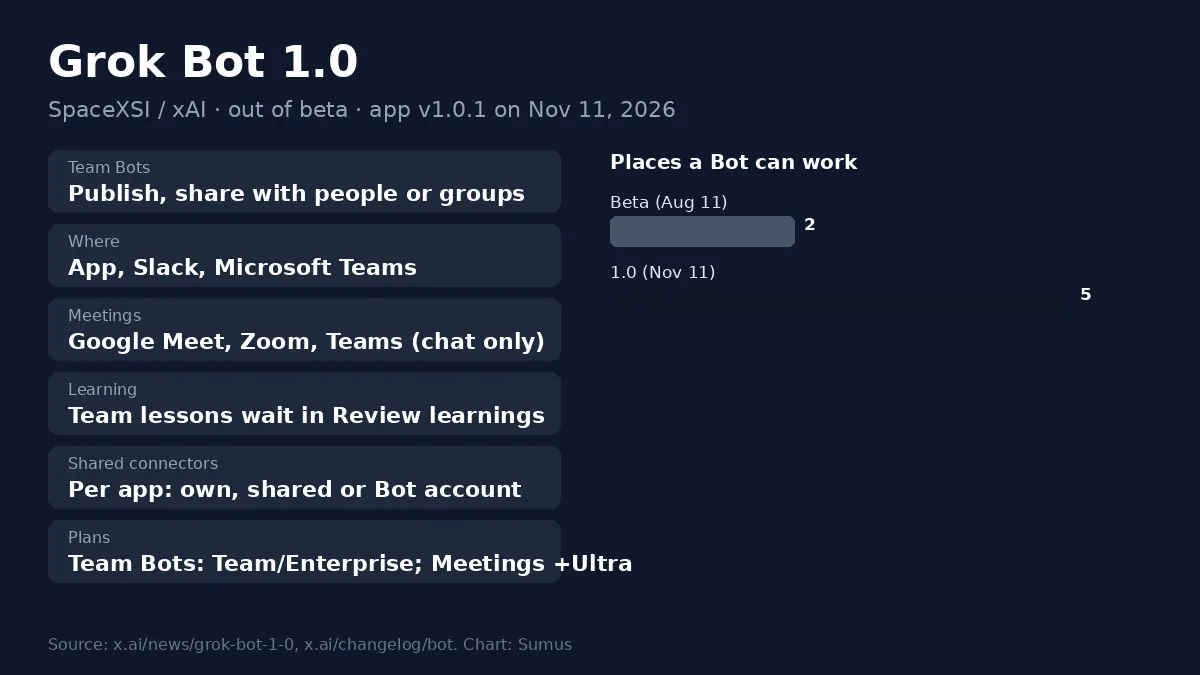
Grok Bot 1.0 turns Grok Bot from a personal helper into a teammate the whole team can use. xAI launched Grok Bot 1.0 on November 11, 2026, ending the beta that began on August 11. The headline: Bots you can share, bring into Slack, Microsoft Teams and video calls, and that offer to pick up work without being asked.
Here is what changed in Grok Bot 1.0, which plans get which features, how to set up a Team Bot, and where Grok Bot 1.0 still falls short for teams.
Grok Bot 1.0 at a glance
Item | Grok Bot 1.0 |
|---|---|
Maker | xAI (SpaceX Super Intelligence) |
Released | November 11, 2026 (app 1.0.0 / 1.0.1) |
Beta began | August 11, 2026 |
Big three | Multiplayer, proactive, more capable |
Where Bots work | App, Slack, Microsoft Teams, Google Meet, Zoom |
Team Bots | Team and Enterprise plans |
Meetings | Team, Enterprise and Ultra plans |
Models | Grok models only |
What's new in Grok Bot 1.0
Beta | Grok Bot 1.0 | |
|---|---|---|
Sharing | Whole team or invited people | Publish first; share with team, org, people or groups |
What teammates teach | Saved for the team at once | Waits in Review learnings for the owner or a Manager |
Where you talk | App and Slack | App, Slack and Microsoft Teams |
Video calls | No | Google Meet, Zoom, Microsoft Teams |
App logins | Owner's apps for everyone | Shared connectors, set app by app |
Who can share | Anyone | Anyone, or admins only |
- Multiplayer: a Bot follows a thread with several people, knows who is who, and can pass work to another Bot.
- Proactive: your Primary Bot spots work and offers to take it, follows up on open tasks and tells you when an app logs you out.
- More capable: better browser use, stronger documents and slides, editable Pages, and approvals that ask less often.
- Small extras in 1.0.1: a 0.5x–2x voice speed slider and a Check price again button on expired orders.
Grok Bot 1.0 in meetings
Paste a Google Meet, Zoom or Teams link into the Bot's chat and ask it to join. The host lets it in, and it shows as "(your name's Bot) - transcribing". It does not speak: you message it in the meeting chat and it answers there. After the call it posts a summary and action items, and it can join scheduled meetings from your calendar.
How to set up a Team Bot in Grok Bot 1.0
- Click + in the sidebar, choose Create a Bot, and name it.
- Tell it what job it does for the team, then connect apps, secrets, skills and files.
- Click Publish. Until then only you can see it.
- Click Share and pick your team, your organization or People you invite. Roles are Collaborator, Manager and Owner.
- For Microsoft Teams, a team admin enables it, the owner connects it, and a Teams admin approves the app.
Each teammate's chat with a Team Bot stays private. In a Slack channel the Bot uses its own computer and the owner's apps, and only the person who asked can approve its actions.
Grok Bot 1.0 limits for teams
- One model family: Bots run on Grok models; there is no model picker, so you cannot hand a task to Claude or GPT.
- Plan gates: Team Bots, Slack and Teams need a Team or Enterprise plan. Solo users mostly get speed and approval fixes.
- Shared logins are risky: with Share your account, everything the Bot does for any teammate happens as you.
- Rollout lag: some desktop apps still showed 0.79 on launch evening; check your version before you look for new menus.
A Grok Bot alternative for teams: Sumus
Sumus already works the way Grok Bot 1.0 is heading, with more choice. People and AI teammates share one conversation, everyone sees the same context, and you assign work in plain words. You can pick Claude, GPT, Grok or Gemini for each cloud agent, and connect the Codex or Claude Code agent already signed in on your computer. Start on the Free plan, invite teammates, and run one shared task to compare.
What we're watching
- Grok 4.8 soft rollout to Bot users this week.
- Whether Team Bots come to individual plans.
- More connectors for shared logins.
FAQ
When did Grok Bot 1.0 come out?
On November 11, 2026, when the app reached version 1.0. xAI's announcement covers changes shipped since the August 11 beta.
Is Grok Bot 1.0 free?
No. Grok Bot needs a paid plan. Team Bots need Team or Enterprise, and meetings also work on Ultra.
Can Grok Bot 1.0 join Zoom calls?
Yes. It joins Google Meet, Zoom and Microsoft Teams calls, takes notes, answers in the meeting chat and posts a summary afterward.
Does Grok Bot 1.0 work in Microsoft Teams?
Yes, new in 1.0. A team admin, the Bot owner and a Teams admin each need to approve it.
Can I use Claude or GPT in a Grok Bot alternative?
Yes. In Sumus you choose the model for each AI teammate, including Claude, GPT, Grok and Gemini.
Update log
- — Nov 12: First version: Grok Bot 1.0 launch (Nov 11), what's new vs beta, meetings, Team Bot setup, limits.